

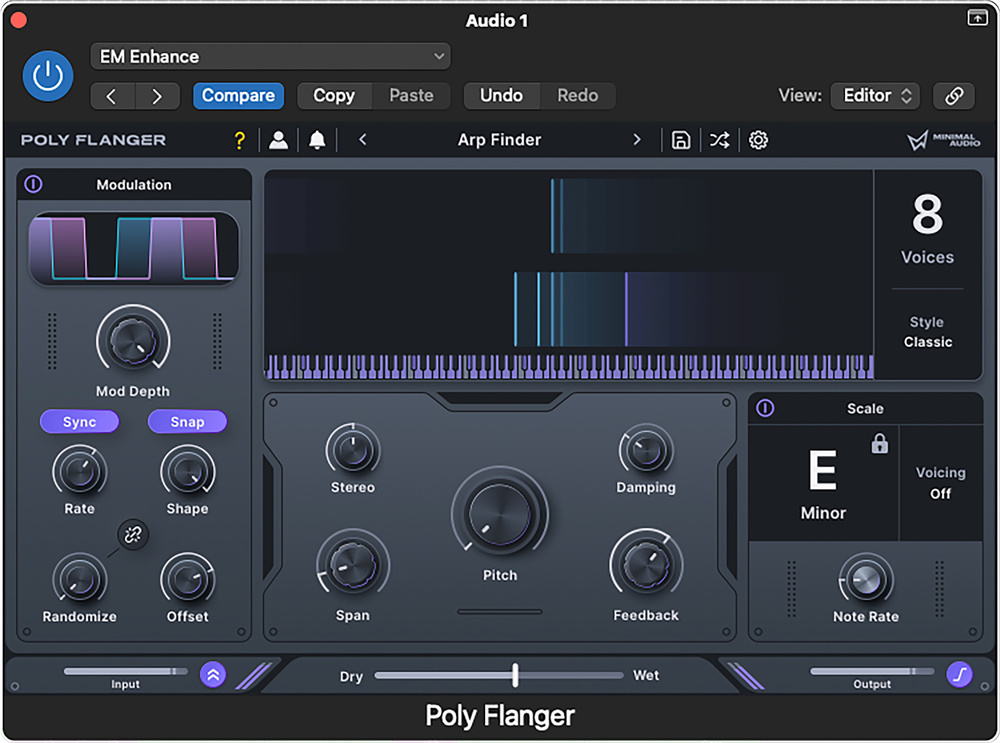
Who’d have thought the humble flanger effect could be made to sound so musical?
Most musicians will know what to expect from flanging, which is one of the oldest time‑based modulation effects — think resonant whooshes with a psychedelic undertone. Traditionally, flanging is created by mixing the dry sound with a slightly delayed copy, whose delay time is modulated, either manually, as with the original tape flanging, or by use of a modulation source such as an LFO. But Minimal Audio’s new Poly Flanger is a bit different...
Flanging, But Scaled‑up!
Poly Flanger supports the usual plug‑in formats for macOS and Windows, and exploits the idea that at different delay times and with added feedback, a flanger can be made to emphasise specific frequencies. By snapping its resonances to musical pitches, it can create a harmony‑like effect comprising up to eight voices. Selecting Scale mode, which includes the key and scale/mode type, allows for the creation of a surprisingly wide range of effects that go from subtle harmonic backdrops to choppy rhythms that stay in key. Of course, it can also do freely sweeping, more conventional flanging effects should you wish.
On the left of the GUI is a modulation section, with LFO shapes ranging from smooth sine via sawtooth to square wave, and a Snap button allows the Shape control to jump from one shape to another, or morph through them. The expected tempo sync options included dotted notes. In addition to rate and depth controls, there’s a Randomize knob for the wave shape, and an Offset control adjusts the relative phase of the left and right channels’ modulation waveforms. A Stereo button linked to the Randomize knob allows separate randomisation to be applied to the LFO for each stereo channel, for added complexity.
In the centre, a Pitch/Tune control can be used to offset (in semitone steps or freely) the pitched effects relative to the selected scale. Span spreads the voices across musical intervals, such that when set at zero all the voices follow the same pitch. Set it higher and chord notes appear and start to spread out at higher settings. Stereo spreads the voices left and right while Feedback and Damping adjust the degree and timbre of the resonances. Above this section, a virtual keyboard displays the flanger pitches or sweeps dynamically. To the right of the display, the Style box offers a choice of three flanger modes: Classic, Hollow (which inverts the delayed signal) or Vapor (which has a more diffuse character). Below, the Scale section presents extensive options for extended chord voicing and chord structure, and sets the rate at which the notes change pitch in scale mode relative to the project tempo.
At the bottom, input and output controls are joined by a switchable output limiter offering soft or harder modes. There’s also a Wet/Dry balance fader, which I’d leave centred for most flanger‑style effects, unless the effect’s intensity needs dialing down.
When a sweep effect has been set up and a scale type selected, the flanger sweep shows up as a pale blue band moving across the keyboard display, while the resonant notes are shown as more intense vertical lines above the keyboard notes being picked out. Scale mode suppresses the conventional flanger sweep, and instead, as the flanger sweeps, you hear harmonically related sets of resonances pulsing in and out. There’s no tracking of the incoming audio involved by the way — everything follows the rules you set in the Scale section. Turn off the Scale section and that familiar flanging sweep returns.
It’s not overstating things to say that Poly Flanger has redefined the range of possible flanging effects.
Pretty Poly?
There’ve been resonant chord effects before but, again, Poly Flanger is different. It allows the effect to reinforce the key and rhythm of the music, rather than adding fixed tones, and at faster rates the effects are almost arpeggio‑like, while low sweeps deliver an evolving sonic character, and the square LFO makes possible various rhythmic effects, from tremolo to chordal stabs. In fact, it’s not overstating things to say that Poly Flanger has redefined the range of possible flanging effects, in much the same way as granular delays extended what could you could expect of echoes and delays.
Categorised factory presets show off the full scope of this plug‑in, and experimental musicians will love it. But Poly Flanger offers treatments that would fit easily into various genres from EDM to pop, and the simple user interface makes dialling in your own treatments easy. Highly recommended.
Summary
A fresh, inspiring and genuinely useful take on the classic flanging effect, Poly Flanger is also really easy to configure.
Information
$49 (discounted to $29 when going to press).
$49 (discounted to $29 when going to press).