

Rating: ★ ★ ★ ★ ★ 5/5 Stars
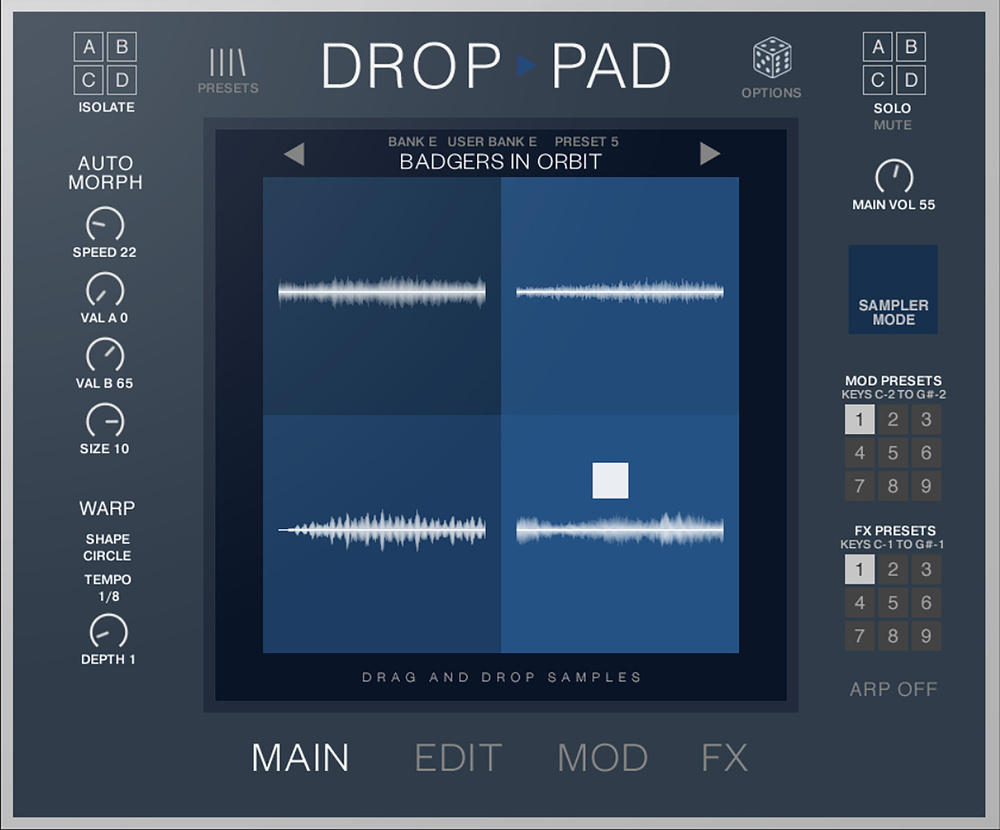
Co‑developed by Berlin‑based Andre Abshagen of Soundtrax and UK sound designers Sub51, the first iteration of Drop Pad was released in 2022, and was soon followed by an update to version 2. The new version 3, though, goes way beyond a simple update. While the interface may look familiar, with its four sample pads and separate windows for Main, Edit, Mod and FX, the new version can now be used with the free Kontakt Player and includes a completely new sample library in addition to the existing Legacy sample set. It also offers full NKS integration.
While Drop Pad 2 relied on Snapshots and manual file handling, Drop Pad 3 adopts an intuitive preset bank system. There are now 144 factory presets, each comprising four samples, arranged in banks designated as Drums, Tonal Loops, FX and Pads, plus 144 user slots. The inclusion of Drop Pad 2’s 293 legacy snapshots not only ensures backward compatibility (once loaded these can be re‑saved as user presets) but samples from the new and Legacy libraries can be combined to create new sounds. Presets can be renamed, overwritten, and organised. While randomisation features are nothing new, the new Sample Randomisation engine selects sounds from the onboard preset pool with user control over the source banks, providing an easy way to generate new sounds to specific requirements. If a pad is soloed then only that pad will be randomised.
The heart of the Drop Pad concept is the way in which the balance of the four samples can be morphed dynamically, and there have been improvements in this area too. There are separate mute buttons for each pad and individual sample pads can be excluded from being morphed by isolating them, or they can be muted to remove their contribution to the morphing process. Manual morph recording can now be sync’ed to DAW tempo over customisable bar lengths. Additionally, the auto‑morph engine with its classic circular modulation now benefits from more nuanced control via the Val A/B settings and adjustable path size.
Drop Pad 3’s FX engine, which has its own page, is based on Kontak’s embedded effects and now offers 14 insert effect types, six reverbs and six delays. Users can save custom effects chains to nine FX presets and adjusting any parameter now updates the current FX preset, eliminating the need to re‑save manually. Also new is an FX Warp tool that uses X/Y‑based automation to control effect parameters, with tempo‑sync’ed mod shapes allowing for rhythmically sync’ed effects.
The Mod page has also been updated with filters (low‑pass, peak, high‑pass), LFOs for control over pan and pitch, and Warp modulation now assignable to individual samples. As with the FX presets, Mod presets are now instantly written to memory and can be recalled using keyswitches, which is particularly useful for live performance. Rhythm loops conform to DAW tempo. Controller values are visible across all pages, and the new pitch‑detection toggle can be used during drag‑and‑drop import. User samples can be imported in WAV/AIFF format, and also individual samples in Logic’s EXS format, simply by dragging directly onto the pads. If the imported samples have a defined pitch, using the automatic pitch detection ensures that everything is in tune and playing the right note. GUI refinements, such as access to key balance, velocity sensitivity and pitch‑bend range on the Edit page speed up workflow.
While still easy to use, Drop Pad 3 feels like a much more advanced product than earlier versions. Its new sample library covers a lot of ground and includes inventive rhythm loops reminiscent of Spectrasonics’ Stylus RMX. There are leads, basses, pads and loops ranging from aggressive to tranquil, but the real key to the Drop Pad sound is the way that the four samples shift dynamically in balance, enhanced by effects that can also shift dynamically, to create ever‑moving textures or rhythm loops. The impressive preset library shows off the various sounds that Drop Pad can create, while being able to drag your own samples directly onto a pad makes experimentation joyfully simple. I was also surprised to discover that almost every click of the random button generated something fresh and genuinely usable.
Drop Pad was always fun and version 2 was a worthwhile update, but Drop Pad 3 feels more mature and streamlined, elevating it from a clever sample player to a very capable sound‑design workstation.
Drop Pad was always fun and version 2 was a worthwhile update, but Drop Pad 3 feels more mature and streamlined, elevating it from a clever sample player to a very capable sound‑design workstation covering all musical genres. Support for the free Kontakt Player should also win it a lot of new friends, especially given its modest cost.