

You are here

Sonuscore The Orchestra Complete 4

Sample Library By Sonal D'Silva
Published April 2026

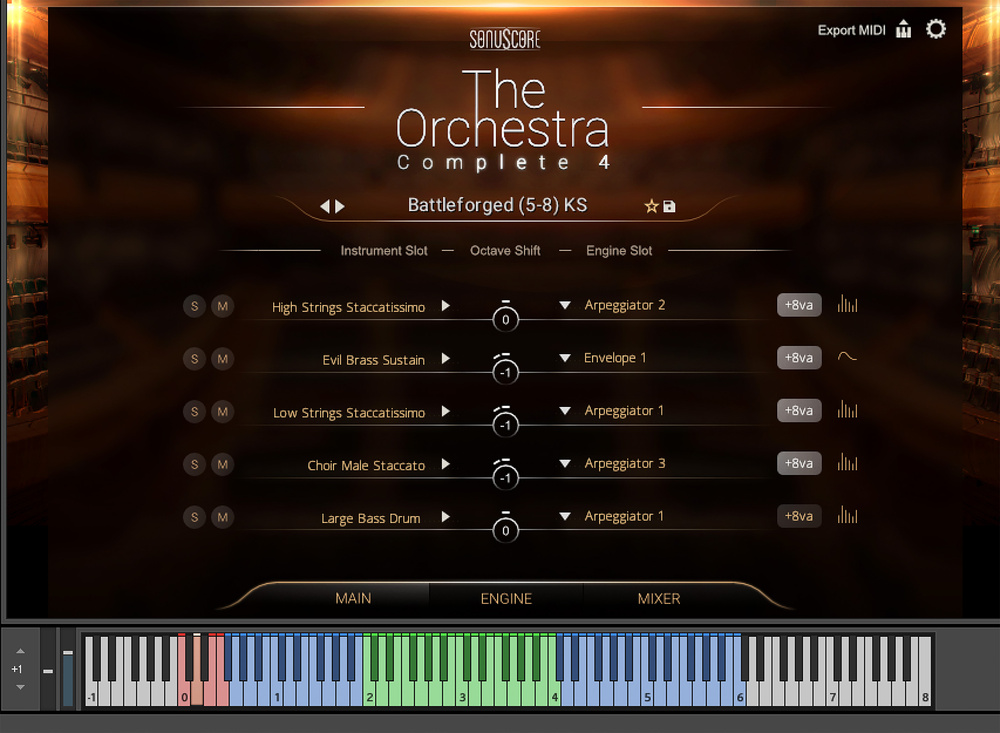
The playable range for each preset/instrument is marked in blue on the keyboard. Animated Orchestra presets, “optimised to sound best in the two octaves around middle C”, according to Sonuscore, are marked in green.The playable range for each preset/instrument is marked in blue on the keyboard. Animated Orchestra presets, “optimised to sound best in the two octaves around middle C”, according to Sonuscore, are marked in green.

Easy and quick orchestral arrangements are very much the order of the day as Sonuscore’s The Orchestra Complete reaches its fourth incarnation.

When it comes to orchestral sample libraries we can safely say that we are well and truly spoilt for choice. There’s a flavour of virtual orchestra out there for everyone, from full‑sized ensembles recorded in the world’s best rooms, to individual instruments captured intimately; physically modelled instruments, for those who value performance above all, and pre‑recorded orchestral phrases for those whose ideas exceed their ability to put them down.

Sonuscore’s flagship The Orchestra Complete series has been a steady presence in this crowded playing field, and, with its latest version, aims to provide even more tools to make orchestral composition faster and more flexible.

Overview

For the newcomers in the room, here’s a quick primer on what The Orchestra Complete (TOC) is all about: an 80‑player orchestral library powered by the Ensemble Engine that makes use of arpeggiators, velocity envelopes and instrument layering to help quickly sketch out musical ideas or craft complex orchestral arrangements.

While TOC allows you to generate an entire arrangement from playing just a single note or chord, it’s worth noting that there are no pre‑recorded phrases in the library, thus ensuring that you have full control of your arrangement at all times. It is this flexibility that makes the orchestra well suited to established composers who might appreciate the speed of an arrangement generated with minimal manual programming, while also wanting control over individual patterns and sounds.
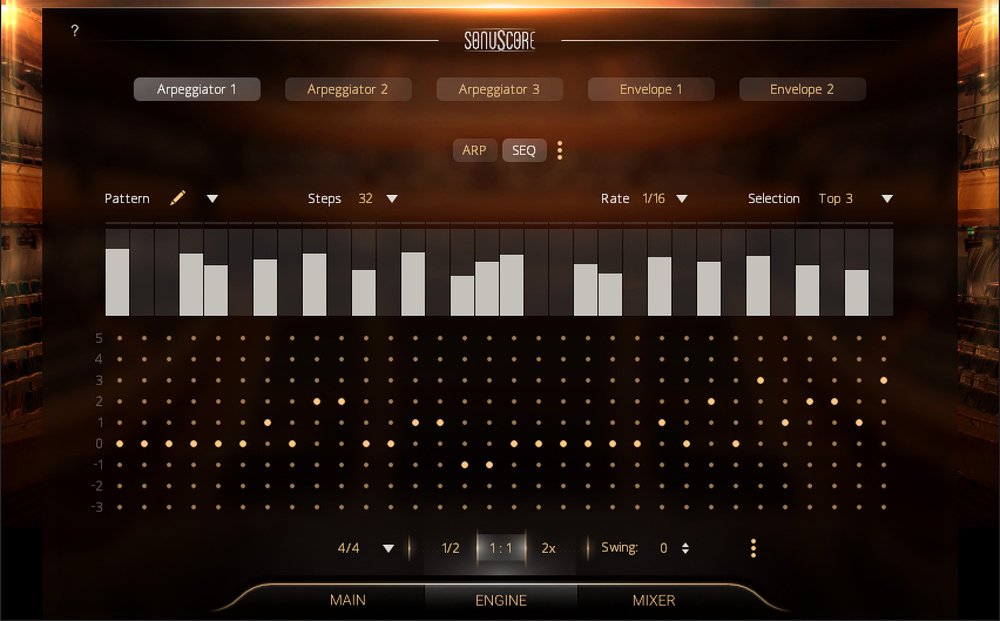
Use the Arpeggiator (Arp) and Sequence Customizer (Seq) together to create rhythmic patterns and customise the pitch of each step within a sequence.Use the Arpeggiator (Arp) and Sequence Customizer (Seq) together to create rhythmic patterns and customise the pitch of each step within a sequence.

SOS carried an excellent in‑depth review of TOC’s ancestor The Orchestra, which you might want to check out to get up to speed if you haven’t used it before. In this review, we’ll focus on what’s new and exciting and how it all plays together.

The Sound & The Fury

The fourth edition of TOC runs in Native Instruments’ Kontakt or Kontakt Player (versions 7.10.7 or higher) and, in its 27.6GB package, contains The Orchestra (the foundation of it all), subsequent expansions Strings Of Winter, Woods Of The Wild, Horns Of Hell and the newest — and equally dramatically named — Forces Of Fury, which, as the name suggests, is designed for writing power‑packed action cues; the more dramatic, the better. With over 150 new presets, expanded articulations, and new single instruments, ‘cinematic’ is the keyword here and to that end, Forces Of Fury brings with it a brand new collection of full string ensembles, and massive percussion samples recorded in London (somewhere unspecified).

So what does Forces Of Fury add to the existing library? It offers an immediately bigger sound (what is often referred to as ‘epic’ in movie circles), and has an in‑your‑face quality that is characteristic of contemporary blockbusters. The core Orchestra pack also has big strings, but they somehow feel stately. Forces Of Fury, on the other hand, is buzzing with energy. These are the strings you bring out for the epic battles, dizzying action sequences and breathless chases. They’re the young guns, first on the field, ready to fire things up. And while Sonuscore have reached for the heights, sonically, the usability of the library remains firmly grounded in practicality. The clean, easy‑to‑use GUI, lightning‑quick preset load times and well‑labelled functions ensure the composer’s workflow is uninterrupted. The search function is especially well organised, which is important when you’re dealing with thousands of presets. You can search the complete collection by library, category, presets, instrument, section, (rhythmic) feel, and character. The last one is very much appreciated; sometimes you just want to know what is Majestic and what is Peaceful without worrying about the deeper, more technical aspects of a preset.

Bigger, Better, Faster, More

TOC4 takes Big Percussion, which already came with previous versions (Taikos, Tom Ensemble, Gran Cassa, Tam Tam, Snare Drum, Piatti, Suspended Cymbals), and supersizes it with the addition of powerful individual instrument and ensemble drum hits. Large Bass, Concert Tom, Metal Drum, Percussion Ensemble, Group Stomps, Snare, Kodo Drum and Log Drum Hits ensure that your impactful trailer moment, rousing battle scene or tense climax won’t land weakly. Performing the individual percussion instruments is a treat, simply because they respond well to velocity. Playing something like Mammoth Drums, for example, is very exciting because you can feel the tension and excitement build as you pound on the keyboard. I firmly believe it makes for a better composition when you get feedback from a virtual instrument. The other plus point is that the drum sounds are big enough right out of the box that you don’t have to put them through parallel compression, layering, or any other sort of processing to achieve cinematic scale.

The string sections have also been boosted in terms of size and intensity while maintaining the speed and efficiency the library prides itself on, so bigger strings doesn’t have to mean more time spent selecting and arranging. Titled simply High Strings Ensemble and Low Strings Ensemble, the performance‑ready cinematic strings are a drag‑and‑drop affair. The Low String Ensemble features six articulations: Staccatissimo, Sustain, Marcato, Marcato Flams, 16th Figures and FX Shorts, available all together in a multi‑articulation NKI, as well as individually. Each articulation in the multi‑articulation preset is easily triggered by simple (and well‑labelled) keyswitches, keeping with the spirit of the library. The High String Ensemble All Articulations patch contains four more articulations in addition to the above: Tremolo, 16th Doubles, 16th Falls, and Sustain Extreme. In the High Strings standalone articulations list, you’ll also find a Stravinsky Staccato preset, oddly not featured in the All Articulations patch.

Keyswitch Cues

In another nod to practicality, the new presets contain sections that are structured like real cues with Intro, Main A, Main B and Outro parts. Switching between them is easy thanks to the powerful new keyswitch system. Within each new preset (look for the ones with a ‘KS’ suffix), simply trigger your section of choice using one of four keyswitches, automatically assigned as Intro (C0), Main A (D0), Main B (E0), Outro (F0).

This not only speeds things up, because you’re spared the hassle of loading a separate patch for each part, but also helps work out your musical ideas. Going back and forth between the Intro/Outro and the Mains let me hear the evolution of the piece I was working on in a way that made it easy to make quick adjustments and test out musical ideas in real time. It’s also fun to ‘perform’ the piece and go through sections with rapid and uncomplicated keyswitching.

A quick aside for those working with a less‑than‑full‑sized keyboard. It’s difficult enough to navigate the entire playable range of an instrument on a small MIDI keyboard, more so when it comes to a full orchestra. Add keyswitches to the mix, in the lowest range of the scale, and it feels even more like programming and less like playing. You can solve this in several ways, documented well on the Internet: acquire a separate small MIDI device solely for keyswitching; remap keyswitches within your DAW; use an app like TouchOSC; or, quite simply, just click with your mouse on the Kontakt keyboard display. It’s clunky, but it works well in TOC4 and the only lag I experienced while testing it out was of my own doing when I didn’t hit the keyswitch on time.

Individual instruments in an ensemble preset can be controlled using the mixer, with most parameters easily assignable to MIDI CC.Individual instruments in an ensemble preset can be controlled using the mixer, with most parameters easily assignable to MIDI CC.

Add Octave

Another interesting addition to TOC4 is Add8va, a feature that enables you to double the octave for each instrument at the press of a button. This ties in neatly with the goal of making parts sound bigger and more dynamic. If you study the pre‑assigned arrangements that come with each ensemble preset, the doubled octave is sometimes the only major difference between the Intro and a Main section, illustrating how you can make a part more powerful with a simple textural addition. Beginner composers sometimes tend to do too much with their arrangements (often out of fear that they’re not doing enough), and this simple technique of doubling the octave has such an outsized effect on making a part seem grander that it’s immediately obvious why the Add8va feature is such a great addition to the library. You could, of course, go overboard and lose all sense of realism in terms of what is possible with an orchestra, but that’s another lesson for another day.

The Settings wheel on the top right of the main window allows you to change the skin of your user interface and access the Humanize feature to add subtle imperfections to your arrangements for a more human feel.The Settings wheel on the top right of the main window allows you to change the skin of your user interface and access the Humanize feature to add subtle imperfections to your arrangements for a more human feel.

Dynamics, Playability, Mix

Dynamics are everything when it comes to making realistic‑sounding orchestral pieces and in TOC4, by default, the mod wheel does the heavy lifting, with velocity sensitivity showing up to play in some presets. From the global settings menu, dynamics control can be assigned to CC1, CC2, or CC11. The up side to having presets that come with pre‑selected and arranged instruments is that the mix is all but done for you. The mod wheel then acts as a sort of VCA fader, which is good if you’re happy with the relative volumes of all your instruments. You can adjust individual instrument levels in the Mixer window, but be careful with tweaking these settings because there isn’t a quick reset button to go back to the default mix levels that come with the preset. So, if you lose the delicate balance of the mix, your only solution is reloading the preset. Ctrl/Cmd‑click resets the faders but only to 0dB, not to the level they were at when the preset loaded. If you would like to control when an instrument comes in during a part, just right‑click and assign its fader via MIDI CC to your keyboard and you have full control.

Marcato, Staccato and Tremolo patches respond wonderfully to dynamics, which is great because it is very satisfying to go for those big stabs and have the instrument react to your playing. The piano patch also deserves a shoutout in this regard. Another shoutout goes to the effects presets, which feature Crescendi, Falls, Rises, Hits and Textures and are very useful indeed. If you remember the early days of sample libraries, you had to painstakingly draw in things like snare rolls and risers. I am very grateful for the ready‑made snare rolls found in the Forces Of Fury Percussion Ensemble preset, because let’s face it, a snare roll is a snare roll — there is no personal touch getting lost here.

The Orchestra Complete 4 is very much a working composer’s tool where the goal isn’t to endlessly chase the perfect composition, but to get the best composition you can before the deadline arrives.

Conclusion

The Orchestra Complete 4 is very much a working composer’s tool where the goal isn’t to endlessly chase the perfect composition, but to get the best composition you can before the deadline arrives. For those used to libraries with more control, you will miss not being able to fine tune things like legato settings, or being able to control the dynamics to a greater degree, but once you start playing to the library’s strengths, you will find you have a powerful, practical tool with which to put down your musical ideas in a fast and efficient way. Combined with the sounds of the previous three expansions that are also included in this latest release, TOC4 is a versatile one‑stop shop for composers working across different mediums.

Pros

  • Perfect for quickly putting down or A/B testing musical ideas.
  • Vast range of orchestral instruments, essential articulations and textural effects all in one place.
  • High level of flexibility allows customisation of individual instruments even within an ensemble patch.
  • Ensembles come mix‑ready out of the box.
  • Bonus effects like risers, crescendi and snare rolls eliminate the need for manual programming of orchestral staples.

Cons

  • Immediately useful for early career composers who may have limited experience with orchestration. However, the price may place it out of reach for that same target audience.

Summary

The Orchestra Complete 4 takes the already generous offerings of the previous iterations and adds grander ensemble strings and more robust percussion for maximum dramatic impact.

Information

$479 including VAT. Upgrade pricing available.

www.sonuscore.com

$479. Upgrade pricing available.

www.sonuscore.com