Updated for a new generation, can the microKORG2 live up to the huge success of its predecessor?
The microKORG. Where to begin? With its legion of long‑time users, it’s not the kind of instrument to be upgraded without some serious consideration. And I dare say the time is right: you hardly need me to tell you that the marketplace is now far more congested and competitive than it was in 2002, particularly in the realm of small‑but‑mighty synths. What was once a reliable slam‑dunk year on year for Korg is now in a position where it very much needs to reassert its relevance for fear of being left behind.
The original microKORG managed to slake the needs of two very different parties equally: preset‑flicking users, with an idea of what sound they want but little to no interest in electronic sound sculpting, and then more experienced players needing a convenient instrument with which they can craft and tweak sounds down to a reasonably fine level of detail. Parallel to this was its modest selection of big, accessible physical controls and, above all, a really rather excellent‑sounding DSP analogue‑modelling system ported straight over from the significantly more esoteric MS2000. All of that really constitutes the criteria for this review: if the microKORG2 doesn’t similarly mediate between depth and accessibility, it simply has no raison d’être.
Next In Line
I’ll try to avoid simply listing the differences between the microKORG2 and its predecessor, but in terms of spec it simply offers more, and in almost every way. It doubles the amount of voices from four to eight, and also the capacity for preset storage from 128 to 256. There’s a new sound engine, more effects and more modulation possibilities, more types of arpeggiator, a significantly upgraded vocal processor, and a handful of new features such as the loop recorder.
The panel’s most conspicuous indication of all this, perhaps predictably, is a lush 2.8‑inch colour screen, which immediately upends the traditional microKORG workflow. I should say straight out of the gate that the original microKORG’s workflow was by a mile the weakest thing about it. Assignable knobs clunkily programmed by way of two encoders; a cramped three‑digit, seven‑segment display doing its best to display words, reams of parameters written on the body of the synth itself... it strays perilously close to the likes of the supremely clunky Korg Poly‑800 (tattooed up to the neck with on‑body parameters — though we’ll forgive it, because, well, it was the ’80s), so I’m glad to see the back of most of it.
Here on the microKORG2, though, there is blissfully little text on the body of the thing. “Don’t worry,” goes Korg’s spiel, “it’s all about enhancing your experience, not complicating it.” Glad to hear it. The fundamentals of the microKORG panel remain, of course: five assignable Edit knobs, a large central Program Select dial and a row of big Program buttons. A Mic knob (to adjust level after A‑D conversion) has appeared next to the Volume knob, and of course the centre of the panel has been all but overhauled with the inclusion of the screen. Impressively, despite feeling sturdier and featuring an improved, slightly bigger keyboard, the whole thing is actually slightly lighter than the original.
You’ll be either pleased or dismayed to know that cheesy genre labels still orbit the Program Select dial, though these seem to have been updated for 2025 (to reflect, erm, Korg’s finger on the cultural pulse?), displaying ‘Pop/Rock’, ‘Funk/Soul’, ‘Hiphop/R&B’, ‘House/Disco’, ‘Ambient/Electronica’, ‘Techno/Trance’, ‘DnB/Dubstep’, and ‘Game/SFX’. Then as now, I honestly cannot think of anybody who would seriously choose to organise their sounds as if they were programming muzak; and the moment you start editing those sounds, you’re likely to deviate from those descriptors anyway.
Flow State
Nonetheless, the architecture of the microKORG2 is intuitive and immediate. If you’re preset‑flicking you can simply turn the Program Select dial, choose one of the four banks below and use the buttons below that to choose a preset. You can also save a set of eight Favourite presets to the buttons for quick access or to craft performance sets, which is handy. Once in a preset, it’s essentially a case of following the buttons on the right side of the panel from left to right — from oscillators, to filtering, to modulation, and so forth. Moving through each button’s screen, the five Edit Control knobs (physically colour‑coded a little subtly but nice and clear on the screen) take on different roles as specified by the GUI, along with live parameter readouts and in most cases quirky little icons and animations to accompany them. Atop the aforementioned Favourite presets, once any preset is edited and written you can save a set of assignments to the five Edit knobs for quickly accessible performance parameters. Lovely stuff.
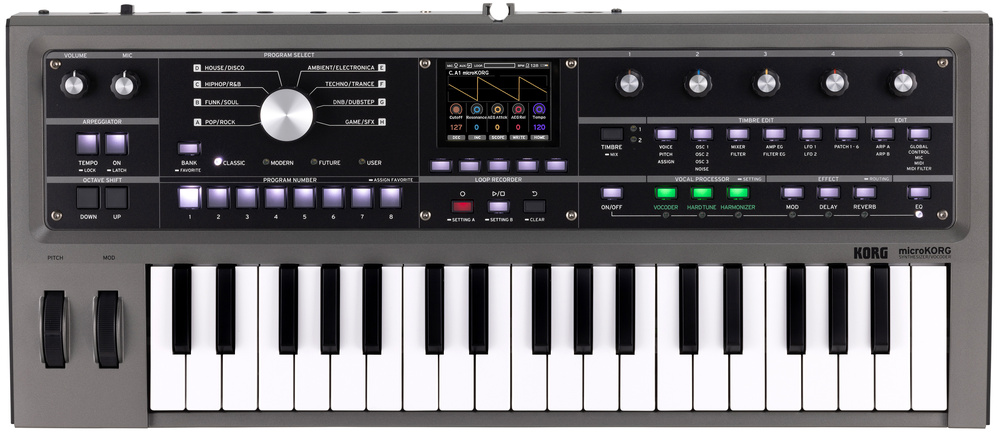 The microKORG2 measures 542 x 238 x 65mm and weighs a portable 2.1kg.
Belied by this slick workflow is the sheer amount of variation on offer with the microKORG2. For starters, like its predecessor, it’s bi‑timbral; a simple and effective way to allow sounds to become more than the sum of their parts, though of course this halves the voice count from eight to four. Each timbre offers three oscillators and a noise generator, each of which presents simple saw, square, triangle or sine waveforms, as well as DWGS (Digital Waveform Generator System), which creates FM‑style tones with single‑cycle complex waveforms, and finally OneShot, which delivers a selection of 32 fairly basic PCM waves for passable pre‑packaged percussive or metallic sounds. The Shape parameter allows for further variation within these waveforms, offering one predetermined parameter for quick waveshaping. With a sine wave, for instance, it’ll clip the wave into saturation; with a square wave it’ll adjust pulse width. For DWGS and OneShot it’ll cycle through samples. Osc Mod allows for cross‑modulation, oscillator sync, ring modulation and variable phase modulation between oscillator 3 and oscillators 1 and 2; there’s also a highly flexible noise generator, with selectable noise ‘colour’, its own filter or decimator and keyboard tracking per oscillator. Whew!
The filter section has all the parameters you’d hope for — different modes, key tracking and the like — but once again there’s a very generous amount of variety on offer, for instance 24dB/oct or 12dB/oct curves for the high‑ and low‑pass filter modes, and also a rather nice‑sounding filter drive. Overall the filter itself doesn’t have much character, but in this instance I wouldn’t expect it to. Its role, like much of what’s on offer here, is to fit into a frictionless workflow, and in this respect it does well.
Micro But Mighty
These are solid building blocks by any metric, but with instruments like this I tend to look to the modulation and effects sections to see what the scope for going deeper really is, and here I was not left wanting. The amount of modulation on offer is quite amazing, with six ‘virtual patch routes’ allowing for up to two modulation sources per patch to control a litany of destinations, from fairly conventional parameters like filter cutoff to more off‑piste ones like arpeggiator octave‑jumping or vocoder formant. The selection of sources itself is also wide, from keyboard tracking to the pitch‑bend wheel.
On the subject of effects, the routing here is highly flexible as well: they’re not just on or off the master bus, they can be discretely assigned to each timbre layer, or to audio coming via the mic jack. Effects are also applied to audio coming in via the Aux In jack: while I couldn’t see a way for this to be switched off without disabling the effects themselves, it does mean the microKORG2 can effectively become a relatively powerful effects processor for just about anything coming down a 3.5mm cable. The effects are organised into modulation effects, delay and reverb. Each of these has generous variety within: there are nine modulation effects, from the expected chorus, phaser and flanger, to other effects that perhaps stretch the category of ‘modulation’ a little confusingly, like compression and even an amp simulator with different amp types. There are six distinct types of delay, from classics like Tape Echo to the more experimental Pitch Shift; and six types of reverb, from Room to the intriguing Rust — a surprisingly characterful lo‑fi style of reverb.
 Round the back we find full‑size MIDI I/O ports, inputs for condenser and dynamic mics, an aux input, damper switch input, stereo audio outs, headphone out and a USB‑C port.
On the vocal side of things, the microKORG2’s included gooseneck microphone is fit for purpose. I’ve seen many online complain at its rough and ready character, but I have to say I quite like it — even if you basically have to kiss it to move the diaphragm. Overall, though, I deem it vital that a mic be included; if for no other reason than the fact that many users — particularly at the less experienced end of the spectrum — would be unlikely touch the synth’s vocal processing capabilities if they had to provide their own. The microKORG2 offers a vocoder, hard tune and harmoniser, each with their own buttons and all of which sound both fun and very useable, particularly when used in conjunction with the effects. The harmoniser I particularly enjoyed, quickly achieving some pleasant chordal stylings straight out of the Bon Iver playbook. It all beds in nicely with other aspects of the microKORG2’s architecture, and as such can be as core a part of the experience as you want it to be.
Interestingly the microKORG2 lacks a sequencer of any kind, though in many ways it makes up for this with a creative array of other, similar features. I was pleased to discover that the arpeggiator — as you may have come to expect by now — capably covers the conventional bases of latching, swing, octave jumping and various pattern configurations, but it takes things further by incorporating a handful of options you’d be more likely to find on an actual sequencer, such as variable gate time and also last step. This clever little feature works in conjunction with the program buttons, which allow steps in the arpeggiator to be skipped for some interesting syncopation. Add to this a bpm‑sync’able delay and the fact that you can choose to only have one timbral layer arpeggiate if desired, and from a very simple starting point you can find yourself in startlingly complex and creative territory.
Work & Play
Fun graphics? Colour‑coded knobs? Trophies? I agree: it does all lean rather heavily toward the Elektron and Teenage Engineering schools of synth design, and away from the distinctly Moog‑ish visual cues of the original microKORG with its faux‑wooden sides. I mean, Korg didn’t think they could include playful graphics and a row of colour‑coded assignable knobs on the upper right of the panel and not draw comparisons to the OP‑1, right? In this respect the only truly puzzling screen page I came across on the microKORG2 is the Trophies page: a series of greyed‑out icons which are then coloured to reward certain ‘achievements’: “To celebrate you exploring the functionality of the microKORG2,” says the manual. I thought that the genre labels around the Program Dial were the cheesiest thing about the microKORG2. I was wrong. It’s certainly a brave stab at the aesthetic those Swedish developers manage to incorporate so naturally, but here executed with all the nuance of David Brent singing ‘Free Love On The Free Love Freeway’.
Just like its predecessor, the microKORG2 is actually a serious instrument and should be considered as such.
The only thing it did leave me wondering is if winning all the trophies somehow unlocks a new bit of functionality. But if that is the case then, in short: I’m fine, thanks. Because, just like its predecessor, the microKORG2 is actually a serious instrument and should be considered as such. It simply masks its seriousness somewhat with a deceptively simple interface — and that, in short, is the magic of the microKORG. It’s finely tuned, flexible and road‑ready. It can cover the basic needs of touring musicians or seasoned producers while allowing scope for surprisingly in‑depth sound sculpting; but it can also coax less experienced players into new territories of synthesis, facilitating genuinely rich and inventive sounds without feeling overly pre‑packaged or, by contrast, daunting.
As I said at the beginning of this review, that was my rubric, and by that rubric the microKORG2 passes with flying colours — and it even manages to do so while disposing of many of its predecessor’s niggles. If you’re in the market for an original microKORG, you’re in luck: I wouldn’t be surprised if the secondhand market is flooded with them this year.
Pros
- A slick and spacious workflow that takes very little getting used to.
- Huge range of sounds on offer.
- Generous amounts of modulation and effects options.
- A well‑designed arpeggiator with a few tricks up its sleeve.
- Sturdy build quality — yet still lighter than the original.
Cons
- With so many assignable functions, endless encoders would be preferable to knobs.
- Needless ‘Trophies’ screen.
Summary
Korg have gone back to the drawing board where it counts and done well to keep the charm of the original microKORG intact. A worthy successor to one of the world’s most popular electronic instruments.
Information
£519 including VAT.
$549.99
When you purchase via links on our site, SOS may earn an affiliate commission. More info...

When you purchase via links on our site, SOS may earn an affiliate commission. More info...