

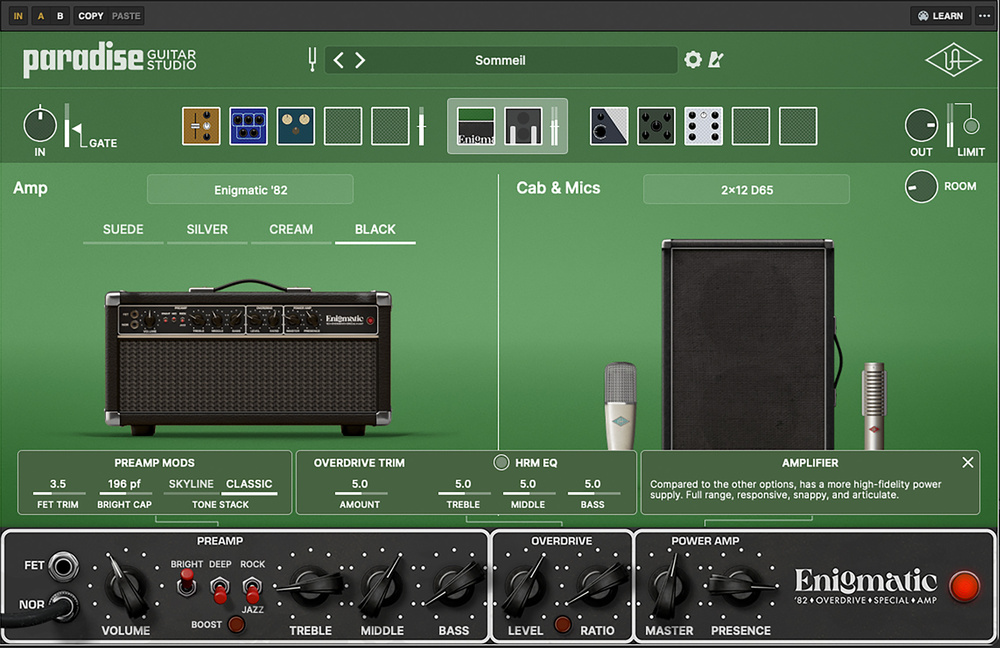
Their UAFX pedals have consistently impressed, and now UA have packed those algorithms and more into a single DAW plug‑in.
Full disclosure: I already own two of Universal Audio’s UAFX amplifier emulator pedals, the Dream ’65 and the Enigmatic ’82. And I use them constantly! By sheer coincidence, the very day that I was considering buying their Dream ’65 plug‑in, in came an invitation to review the Paradise Guitar Studio plug‑in. I’ve been exploring it — playing in Paradise, as it were — obsessively ever since.
The usual plug‑in formats are supported for macOS and Windows. Note that, to obtain and install the plug‑in, you must sign up for free Universal Audio and iLok accounts (if you haven’t got them already) and download the UA connect app.
Overview
Paradise Guitar Studio has a single signal path, consisting of five pre‑amp effects slots, an amp and miked‑cabinet slot, and five post‑amp effects slots. Mono, stereo and mono‑to‑stereo operation are supported, so the plug‑in can be used on any source in a stereo DAW session. The pre‑effects section can process effects in mono or stereo, as you prefer; opting for stereo means an incoming stereo signal remains in stereo after being processed by a mono effect, but this requires more processing power than the default mono setting. The post‑effects section always maintains the stereo signal, even if a specific effect is set to process in mono.
A Paradise preset can be configured with up to five pre‑amp effects, one amplifier with one miked cabinet, an independently adjustable cabinet room sound, and up to five post‑amp effects. In addition, there’s an input noise gate and an output limiter that don’t take up slots. Any effect can be used simultaneously and independently in the pre‑ and the post‑amp effects sections.
Paradise has a clean, uncluttered layout, with various panes and a toolbar above for functions including bypass, MIDI Learn function, and copying and pasting effects to/from the pre‑amp and post‑amp effects slots. The uppermost pane offers access to a tuner and preset library, and is where you configure the pre‑amp effects for mono or stereo operation. Beneath this, a Level & Navigation bar carries a graphical display of each section and its contents. This also hosts controls and meters for the input level, a noise gate, the pre‑amp effects section’s output level, the amp and miked cab output level, and the post‑amp effects output level. The individual effects and amps have level controls too of course, so there’s plenty of scope to optimise signal levels — you can keep them in the sweet spot throughout the signal chain. A switchable brickwall limiter, placed after the post‑amp effects output meter, can ensure the main output level never exceeds 0dBFS.
Clicking on a section in the Level & Navigation bar determines the Main panel’s contents. In this panel, you can import, delete, replace and adjust the controls of the effects you’ve placed in the pre‑ and post‑amp effects slots, as well as audition, select, replace and customise Paradise’s six amps — two of which contain multiple models, to give you a total of 11 separate amps to play through and customise. The Main panel also provides access to a library of 35 cabinets, with a selection of 1x12, 2x12, 4x10 and 4x12 models featuring a range of different speakers. To inform the modelling, recordings were made with mic setups UA deemed best for the specific cab. The sound and position of the mics can’t be changed, then, but you can choose different cabs, and the Room control allows you to dial in room ambience to taste.
The final pane displays the front‑panel controls of the selected amp. The virtual knobs and switches work exactly as you’d expect, and there are buttons for functions that would be footswitched in the real world. On models with a choice of which inputs to plug into (or jumper), you can unplug and replug virtual cables.
Exploring
To give you an idea of what Paradise can do, it comes loaded with 300 presets that deliver vintage‑leaning tones based around amplifiers from the mid‑1950s (Woodrow ’55) through the early to mid‑1960s (Ruby ’63, Showtime ’64 and Dream ’65), late ’60s into the ’70s (Lion ’68), and the early 1980s, with the Enigmatic ’82. It’s similar for the speaker cabs: there are 10 1x12, 15 2x12, two 4x10 and seven 4x12 cabs in the list, and the cabinet graphics suggest they’re mainly vintage too, with just a few of more modern construction. The speaker drivers themselves seem to be mostly Celestion, Electro‑Voice and Jensen models, but there’s an Oxford listed in a 1x12, and my best guess (I’m not certain!) for one of the 4x12 cabs is Goodmans Audiom ’60s. The mics used to record the cabinets were AKG C414 and Neumann U67 capacitor types, beyerdynamic M160 and Royer 121 ribbons, and a Sennheiser MD 421 and a couple of Shure SM57 moving‑coil dynamics.
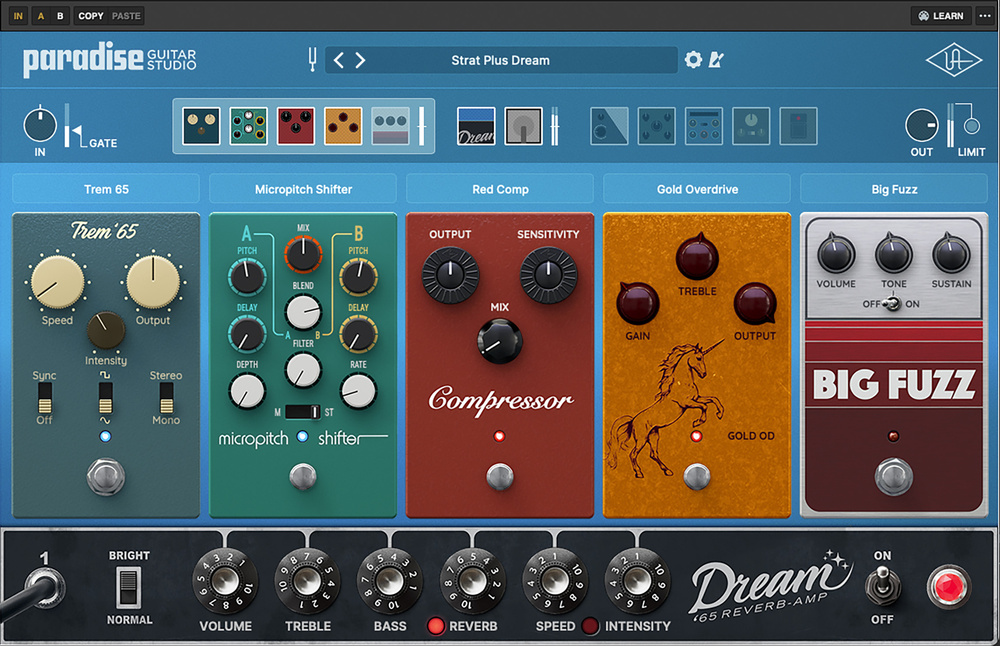
The effects again lean in a vintage direction. In the Drive/Distortion section, the inspirations for TS, Gold, Big Fuzz, RAW Distortion and Vintage Fuzz are obvious from their graphics, but I needed Google’s help to identify the Nashville overdrive! The Modulation section’s Brigade Chorus, Orange Phaser, Blue Flanger, Trem 65 and Microshift again betray their origins pretty quickly if you know your pedals, and a certain blue‑fronted 1970s rackmount effects unit from upstate New York. I was stumped by the Vintage Vibrato (searching for “true vibrato” revealed it to be a Magnatone), and the Multi‑Chorus is, to my mind, probably UA’s own algorithm. The genesis of the two Dynamics models, Red Comp and 1176 compressor, are easily identifiable — MXR made the only famous single‑knob, red compressor pedal, and UA don’t even need to be cryptic about the 1176!
In Delays, the Analogue Memory Delay and the EP‑III Tape Echo are easy to identify, especially as the latter already exists as a UAFX pedal. The Digital Delay and Pitch Shift Delay are probably UA‑original modelling algorithms. As for the reverbs, the Spring ’65 Reverb obviously comes from a 1965 Fender Deluxe Reverb, the Digital Reverb could well be a UA algorithm, and the Plate 140 Reverb and Reverb 224 have roots in UA’s Apollo and UAD ecosystem. Lastly there’s the Tone/Filter section, which contains a 10‑band graphic, a four‑band sweep EQ with high‑ and low‑pass filters, and a volume fader that thinks it’s a pedal. In short, there’s plenty of ground covered here!
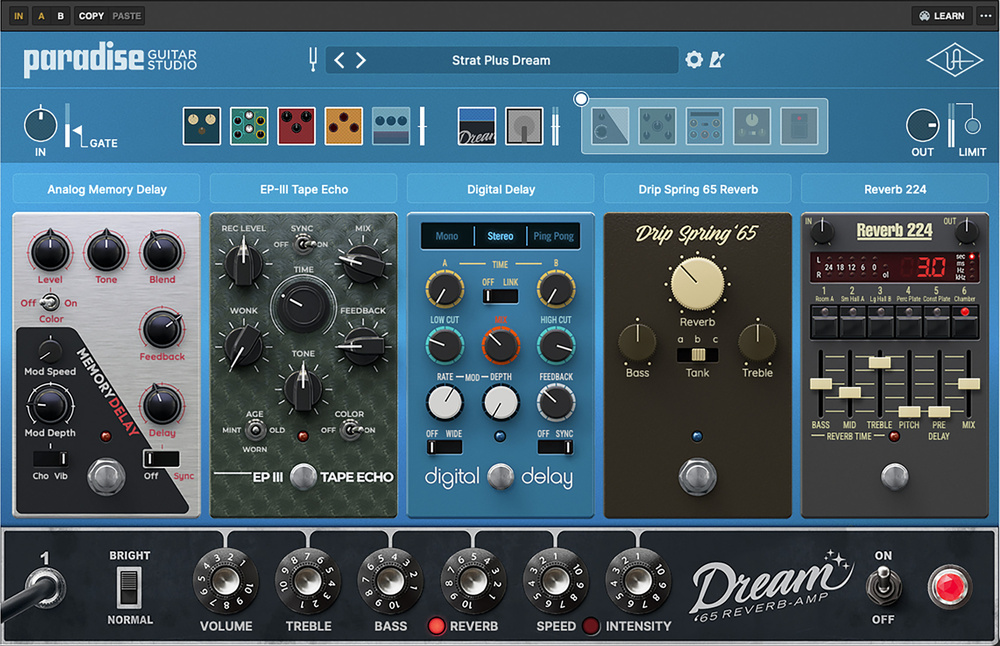 As with the amps and cabs, there’s a good range of modelled vintage effects. Most are instantly identifiable, though a few might prompt a bit of Googling!
The Sound Of Paradise?
My first few days in Paradise were spent exploring the many presets just to see what was on offer, and my first impressions were very good. Later, I started exploring the presets more slowly, and in more detail. I’ve not found a bad sound yet! Any preset that hasn’t worked for single coils has done so for humbuckers, and vice versa. There are some that I’ll never use, and others that I could (and often did) spend a very long time with. I found many of them genuinely very inspiring, and others less so — but that simply reflects the vagaries of my own musical muse. There’s plenty here for everyone, and the quality is universally high.
Building your own chains in Paradise is conceptually just like putting together a real pedalboard: pick an amp and cab, decide what you want to put before it and after it, and then change your mind as much as you like until you find the sound that you want! You can save your chain as a preset, of course, then make music and keep on tweaking until everything sounds exactly right.
Yes, there are other guitar rig plug‑ins that offer greater functionality — more models, clever routing, amp capture, IR loading and more besides. The reason Paradise Guitar Studio doesn’t offer all those bells and whistles is that UA have instead kept a laser‑like focus on the quality of their emulations, and that’s why I love the real‑world restrictions that this plug‑in imposes. They ensure that everything feels as immediate to use as a real rig, which I think is what most guitarists want.
The sense of realism in the modelled pedals, valve amps and cabs that I happen to know well is hugely impressive.
I’ve reviewed lots of guitar, amp, cab and effects modelling platforms, in hardware and software, and none impressed me on its debut as much as Paradise has done. The sense of realism in the modelled pedals, valve amps and cabs that I happen to know well is hugely impressive. Clearly, UA’s Chief Scientist Dr Dave Berners and Senior Product Designer James Santiago went into forensic detail when developing their models. Whether you’re a guitarist who works with DAW software and values classic amp tones, or you’re more into mixing and simply want a greater range of convincing emulations, Paradise Guitar Studio delivers superb value for money. I’d urge you all to check it out.
DAW Automation & MIDI
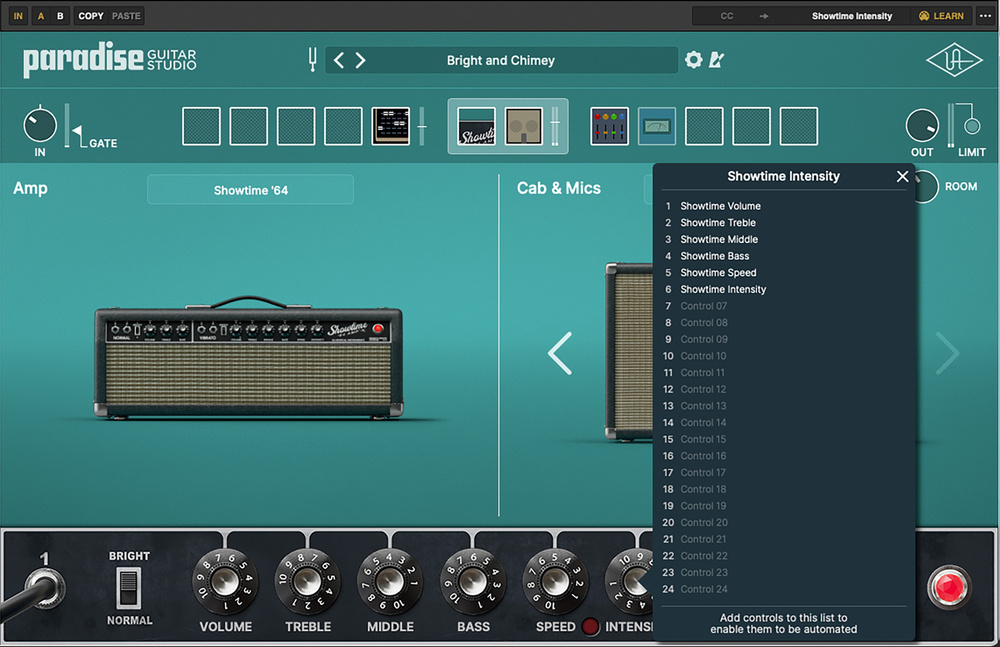 Paradise Guitar Studio supports not just DAW automation but also MIDI Learn.
If your DAW supports automation, right‑clicking on an effect or amplifier control will open up the preset’s 24‑slot assignment screen. You can assign any control to any slot so you could, for example, keep all the distortion pedals’ drive and output level controls in separate groups. If you want to use an external MIDI controller, Paradise’s MIDI Learn feature makes that a breeze. Once you’ve mapped your external controller to a preset’s on‑screen controls, you can then save that MIDI mapping as a preset which you can recall, use, edit, re‑save or delete in any DAW project.
Summary
A very impressive DAW plug‑in from one of the major names in modelling, Paradise Guitar Studio offers stellar, vintage‑leaning emulations of guitar amps, cabs and effects.
Information
$199. Discounted to $149 when going to press.
$199 (discounted to $149 when going to press).