

Already leading the way when it comes to plug‑in remote control of analogue hardware, Wes are now bringing their expertise to bear on a wider range of processors.
Analogue multiband compressors remain rare: they’re relatively expensive to implement, and the necessary user controls can take up a lot of space. Unsurprisingly, then, they’re rarer still in the 500‑series format, and Wes Audio’s Pandora is the first I’ve seen that delivers anything like ‘conventional’ analogue three‑band compression in this format. But it offers way more besides. As well as boasting other processing options that I’ll explore below, it can be remotely controlled by a DAW plug‑in to facilitate recall, automation and preset management. Yet, while the plug‑in is rightly a headline feature, pretty much everything can still be done using the touch‑sensitive front‑panel hardware controls too. In fact, you can use the hardware to control the plug‑in and record automation as well. Importantly, this arrangement reduces the risk of the Pandora ever being rendered obsolete by OS or DAW developments, and (for whatever reason) a lack of software support in the future.
Hands On
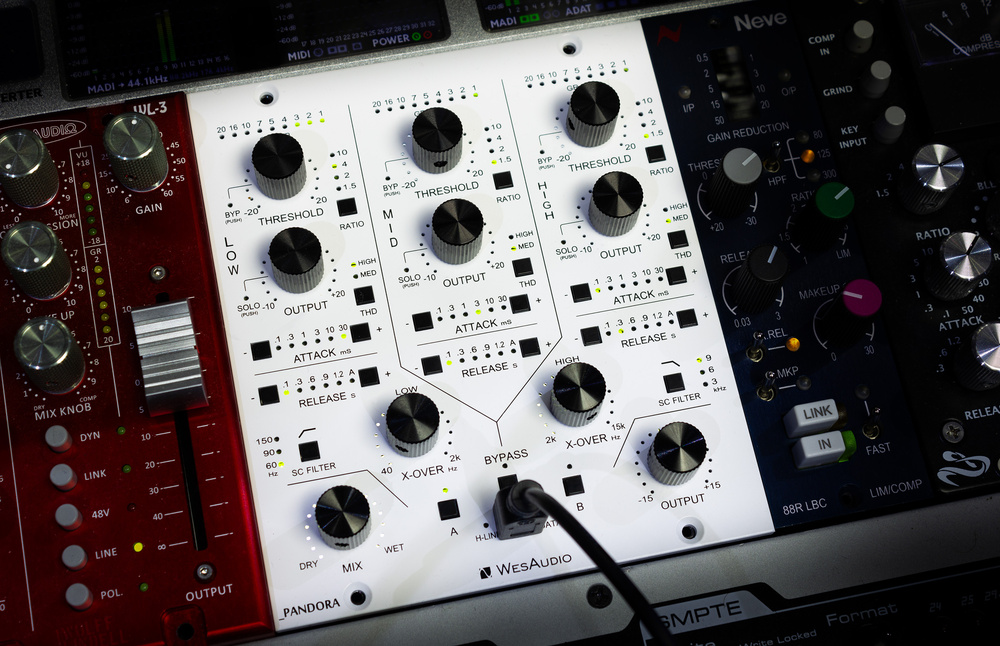
So let’s start with the hardware. The Pandora is W I D E! Though a stereo device, it occupies three module slots in the host 500‑series rack: it uses only the leftmost pair for power and I/O but physically extends across the third, such that slot 3 can’t be used for other modules.
There’s a lot of information on the front panel, but it’s all sensibly laid out. While the A and B preset storage/recall buttons (you can also copy settings from one to the other) are arguably harder to use when a USB cable is plugged into the front panel, you’ll likely be using the plug‑in’s greater options for that function, and if it really bothers you then Wes’ Titan ng500‑series rack can provide the necessary USB communication through the card‑edge connector.
The main hardware controls are either touch‑sensitive digital push‑turn encoders or buttons, with various tiny green or red LEDs indicating the status. Nicely visible without being over‑bright, these are particularly effective at indicating the position of the rotary encoders: multiple LEDs of different brightnesses combine to give really precise feedback, and I’ve not seen anyone do this better.
Thin black lines group the controls visually, into one of the three frequency bands or for global functions. Each band, running from left to right, has a threshold encoder with a nine‑LED gain‑reduction meter above (again, elegantly implemented). The threshold control is a push‑turn encoder: turn to set the threshold, or push to bypass compression for that band. This is one of the touch‑sensitive ones, and putting your fingers on it will highlight the corresponding controls on the plug‑in when in use. The same goes for the output level control, for which a push solos that band.
The remaining per‑band controls are buttons that step through their different parameters’ settings. One sets the ratio (10, 4, 2 or 1.5:1 for all bands), and another adds harmonic distortion (High, Med or off), which you can think of as a saturation effect. Further down, the attack (0.1, 0.3, 1, 3, 10 or 30 ms) and release (0.1, 0.3, 0.6, 0.9 or 1.2 seconds, or an automatic release) each have a pair of buttons, one to scroll up through the options, the other down.
Below are various global controls. Between each pair of bands is a knob to set the frequency of the crossover filter. While these are also push‑turn encoders, there doesn’t appear, at the time of writing, to be any action mapped to the push function. The filters range from 40Hz to 2kHz and 2‑15 kHz, respectively, both with gentle 6dB/octave slopes. There are also side‑chain high‑pass (off, and 60, 90 or 150 Hz) and low‑pass (off, and 3, 6 or 9 kHz) filters. A final pair of encoders, at the bottom, set the overall wet/dry mix and the output level, and in between them are the A and B preset save/recall and master bypass buttons.
Remote Possibilities
The mini USB socket allows connection to a computer when the Pandora is used in a standard 500‑series chassis, and its purpose is to connect with the control plug‑in (communication is bidirectional — adjust a hardware control, and that’s reflected on the plug‑in; adjust a plug‑in parameter and the hardware follows suit). There’s no Ethernet, as on some manufacturers’ devices, and one potential drawback with USB is that (unless using active or optical USB, where cable runs of 10m are feasible), the cables can’t be longer than 2‑3 metres. That won’t be an issue for most people, but could be a consideration if, for example, your main studio DAW computer is tucked out of the way in a machine room.
When you first load the GControl software and connect your Wes modules, any necessary firmware updates are performed automatically — and, mercifully, pretty quickly.Installation of the GControl software and associated plug‑in is straightforward. It’s a fairly large download, since it contains plug‑ins for all the remote‑controllable Wes gear, along with firmware updates, but you can choose which plug‑ins to install, and the firmware updates are performed automatically for any units that are connected when you install the software. That happened for me, and it was a stress‑free experience. Both GControl and the plug‑in can run on Mac or Windows DAWs, and you can install VST2, VST3 or AAX formats.
There’s still a part of me that misses Wes’ old skeuomorphic plug‑ins, whose GUIs very closely resembled the hardware, making operation completely intuitive. But, on balance, the greater functionality and use of screen real estate of the newer GUIs is winning me over. This particular one has lots to commend it: it’s very slick, and puts me in mind of the FabFilter plug‑ins, with a visual representation of the frequency response, and your choice of nodes and drag handles, or floating virtual knobs, to manipulate the band levels, crossover points and compression thresholds. Sensibly, parameter settings that on the hardware are accessed by multiple button presses can here be selected directly, and each is given its own virtual LED (plus a scroll button if you really want one!). Each band also has a vertical gain‑reduction meter that’s much easier to read than the hardware meter, as well as dedicated bypass and solo buttons.
Wes’ control plug‑ins no longer slavishly adhere to the hardware layout, and offer modern features such as node‑on‑curve adjustments, drag‑handles to set the crossover points, and direct selection of parameters that, on the hardware, you must scroll through to select...
At the top, you’ll find global controls: not just knobs for the crossovers, the wet/dry mix and the output level, but also a master threshold control that allows you to ‘scale’ the settings of the bands’ individual ones without losing their relationship. Also at the top is a full preset management system, so you can store and recall many more settings than on the hardware, and a useful array of starting points (you’ll obviously need, as a minimum, to change the thresholds to suit the material being processed), as well as the usual plug‑in functions such as undo/redo and the global bypass. And at the bottom, as well as details of the connected hardware (which you have to select on first initiating the plug‑in, but will be remembered next time you load the project), you’ll find that in place of the hardware A/B compare buttons, you have a vast number of snapshot slots, organised in 20 banks of three.
...but the control set adapts as you resize the GUI, and if you prefer a more compact hardware‑like control set, that’s available too.
There’s still more... While some will love all this control and information, others might prefer a more hardware‑like GUI or want to save screen space. Fear not, because not only is the GUI fully resizeable, but as you scale it down some of the elements that no longer fit start to disappear. By the time you get down to about 50 percent of the default size, you’re left with just the essentials: the curve, nodes, drag‑handles and so forth disappear, leaving you with a very focused control set. By the way, another nice touch is that while the maximum GUI size is 200 percent, the plug‑in detects your screen size and prevents you from choosing a setting that would expand the GUI off‑screen. I wish more plug‑in developers would do that! It all comes together very nicely indeed.
In Use
Most users will opt to use the plug‑in, but the GControl software also offers standalone management of setting storage and recall.As with most of the Wes Audio gear that I’ve used in recent years, the Pandora sounds great, and I genuinely can’t overstate that: for all the cleverness of the digital control, what the analogue electronics can do to your sound is all important, and these circuits do indeed sound superb. The Pandora is admirably clean and quiet — the only audible noise I noticed was already in the source signal, and lifted up by compression and make‑up gain. I don’t really feel the need to say much about the compression action itself — it’s everything you’d expect from modern VCA compressors, with anything from fast to slow actions, and very easy to dial in. That there are three bands and you’re able to set the (global) wet/dry mix makes it more versatile than most, but you get the idea.
Having said all that, you can make the Pandora sound ‘unclean’ if you wish, as the THD options can inject some attitude. The Pandora being a stereo device, I loved experimenting with it on subgroups and the stereo mix bus, but there’s no reason you couldn’t use it on individual sources. We’ve seen this facility many times before on Wes Audio devices but because of the multiband nature of this processor, its ability to solo bands or bypass their processing and, particularly, the global wet/dry mix control (that facilitates far more subtle mastering treatments), it’s incredibly useful. It’s so easy to focus this distortion on a band to have a very specific effect: using a single band to give the high end a harder edge, say, or add thickness in the bottom end to convey a sense of power on smaller speakers. You can do a bit of both at once, of course, and add saturation to the mid band too if you want, with the High/Med settings set individually for each band.
For all the cleverness of the digital control, what the analogue electronics can do to your sound is all important, and these circuits do indeed sound superb.
Also worth bearing in mind is that you can use this device purely for this multiband saturation effect, without needing to dial in any compression — to do that, just set the threshold to maximum. And finally, in terms of processing options, let’s not forget that as with any multiband compressor you can use the bands’ make‑up gain controls — again, with or without compression — as a broad‑brush tone‑shaping stereo equaliser. And if you start those EQ moves with the mix control at the halfway point, you can also use that knob as a means of scaling your EQ curve up/down too. Very neat!
The band solo facilities make assessing these sorts of effects and, particularly, judging the optimum crossover filter frequencies for them, really simple. Another thing that makes all your processing decisions particularly easy to make is, to my mind, one of the key benefits of remote plug‑in control, but it’s easy to overlook it... Lots of people will naturally focus on the ability to save and recall settings with your session, to build a library of presets, or even automate parameters (which works very well — no problems with audible clicking between settings). But one of the biggest benefits of any plug‑in is that you can make all the adjustments you need while sitting in the listening sweet spot. No need to move your head as you reach for the controls!
Verdict
The Pandora is an excellent stereo, three‑band VCA compressor in its own right. But it doubles up as a stereo EQ and saturation device too, so it’s by no means limited to a ‘special occasion’ use. Indeed, it could be a real studio workhorse. You could never load the plug‑in at all, and all of that would still apply, but the plug‑in is not mere icing on the cake: it genuinely opens up different ways of working. Down sides? Well, it does occupy three module slots, which adds a little to the expense. But we’re splitting hairs there, and with six gain‑reduction stages on board, I reckon it’s great value for money. I’ve said it before, but when it comes to plug‑in remote‑controlled analogue hardware, Wes Audio are currently the ones to beat.
Pros
- First and foremost, it sounds good!
- Touch‑sensitive hardware control.
- Very slick remote‑control plug‑in.
- More than a compressor!
Cons
- Uses up three 500‑series rack slots.
Summary
The Pandora is a superb three‑band compressor and saturation processor that has more potential applications than you might expect.
Information
When you purchase via links on our site, SOS may earn an affiliate commission. More info...

