

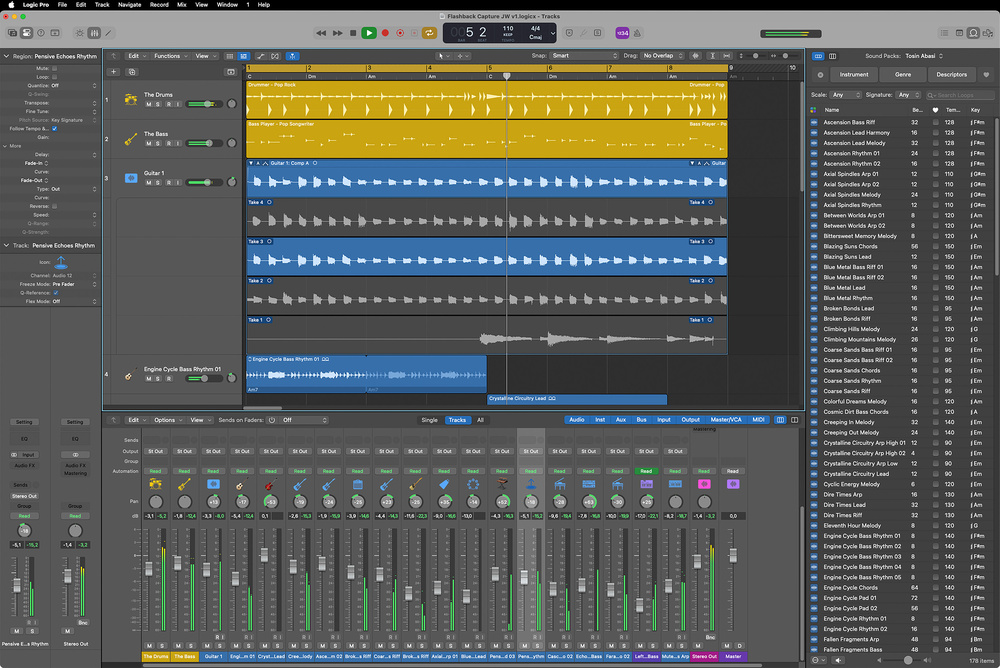
 While Flashback Capture for retrospective audio recording, long faders in the Mixer, an improved Stem Splitter and new sound packs are the highlights, the Logic Pro 11.2 update brings a long list of new and improved features.
Apple deliver plenty of refinements in the latest update to Logic Pro.
While ‘dot’ updates to any top‑end DAW are unlikely to deliver revolution, alongside some minor stability and reliability fixes, Apple’s recent release of Logic Pro 11.2 does manage to pack in some rather useful ‘new and improved’ items. As usual, the update is free to existing users. Indeed, the list of refinements is pretty extensive, so I’ll focus here on the obvious highlights and, to cover a few extra bases, squeeze in a best‑of‑the‑rest list before I finish. Let’s explore...
Do The Splits
Just a few years ago, the ability to ‘unmix’ a stereo audio file into separate stems seemed like absolute magic. Actually, it still does, but the quality of those separations has improved considerably. Equally, this is no longer a process that is confined to specialist spectral editing software. Stem separation arrived in Logic Pro 11 (see Paul White’s article in the December 2024 issue of SOS for an introduction) but 11.2 both expands on what’s possible (more stems) and improves the quality of the separations.
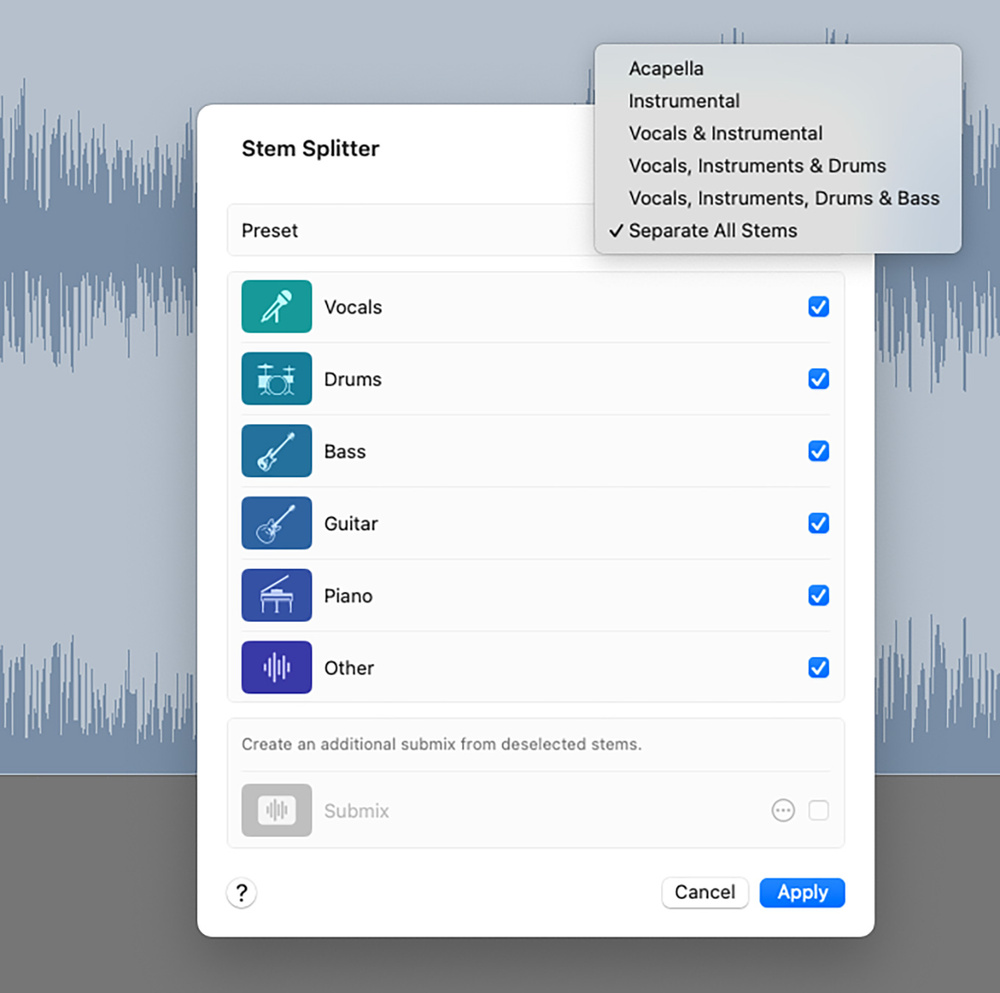 Logic’s Stem Splitter now offers up to six stems as well as improved audio quality of the separations.Up to six stems can now be extracted, with new options for guitar and piano added to the existing vocals, drums, bass and ‘other’ stem options. The Stem Splitter dialogue offers a range of preset stem selections, but you can make your own selections as required. Stem Splitter does require at least an M1 processor but on my M4‑based host computer, the separation process was suitably speedy for a typical three‑minute song‑style audio file. Once completed, the stems appear within a suitable Stack ready for auditioning and/or editing. I was generally impressed with the quality of the separations and, compared with v11, I do think the results are cleaner and any artefacts less noticeable.
There is undoubtedly some quality leapfrogging with this technology as developers of different products go through their update cycles, so the ‘best’ option is hard to pin down at any one time (SpectraLayers 11’s ‘Extreme’ quality mode would currently get my vote, but it requires considerably longer processing time than Logic uses here). However, Logic Pro is very capable. Yes, as with other stem splitter software, the results are very dependent upon just how busy the original mix is and, when isolating vocals, the results will be impacted by the presence of ambience effects (delay and reverb) and harmony/backing vocals. However, there are plenty of use‑case scenarios where Logic’s stem splitting will be more than usable. Whether it’s for a simple mix rebalancing task, creating an instrumental‑only mix, adding effects to specific stems, or even replacing a stem (new bass part anyone?), it’s surprising just what you can now attempt. And, if stem splitting is something you do use, it’s a considerable convenience to have this functionality built directly into Logic.
Incidentally, Fadr’s online stem separation system now offers separate stems for lead vocals and backing vocals. I think this may be a first and, while I’ve not tried it, if you are keen on repurposing a capella lead vocals into a full song remix, this is an option you may have been waiting for. Other developers will undoubtedly follow, so maybe this is something for Logic Pro 11.3? Fingers crossed.
Inspiration Safety Net
Logic Pro’s Capture Recording feature has been renamed to Flashback Capture and, while the previous version allowed you to retrospectively capture a MIDI performance, in 11.2 you now also get the option to capture audio. If you have ever missed that inspired vocal or guitar take as you were just warming up (haven’t we all?), then this will be a very welcome addition.
There are some understandable technical differences between retrospective audio and MIDI recording. For example, for audio, Logic must be in playback (this is not required for MIDI) for the background capture process to be active and an audio track needs to be record enabled. However, both these conditions are likely to be met in the most typical situation where you are just running through a song section while working out and/or warming up for a specific part. Logic will capture up to three minutes of audio into a suitable buffer. This buffer is cleared every time playback is initiated but, if you want to capture a performance, you can simply stop playback, hit Shift+R, and the audio will appear on your record‑enabled track as if you actually had record active; very neat. Incidentally, you do have the option to add a dedicated Flashback Capture button to Logic’s transport control section within the Toolbar (see the main screen) if you prefer.
A few technical details are worth noting. First, if you go beyond three minutes during playback, only the most recent three minutes of audio will be captured. Second, if you are cycling playback through a particular song section, the capture process will retain just the first four passes, even if the total recording time is less than three minutes. However, when you trigger Flashback Capture in this situation, rather wonderfully, as can be seen in the main screen, those (up to) four passes do appear as multiple takes. Third, for audio, Flashback Capture will only work for a single audio track at any one time, so this won’t be something that could rescue you when you failed to hit the Record button and the band just did the perfect take.
OK, so Logic Pro is not the first DAW to add retrospective audio capture, but I have to say that, in practice, it works very well. It’s a welcome addition and I’m sure almost every user will find themselves smiling every time it saves a moment of musical magic from being lost forever.
Throw Long
Also welcome is the new option for long faders within the Mixer. This can be activated via the Mixer’s View menu and is available independently for the main Mixer window and the Mixer panel within the Main window although, unless I’ve missed something obvious, not within the Inspector (hopefully that will be added at some stage).
Obviously, the longer fader throws make it easier to perform finer‑resolution level adjustments and, while you only get the choice between the standard and long options (you can’t manually scale the fader length), it’s an addition that will undoubtedly make mix automation tasks easier.
Fancy A Chat?
Given how divisive AI technology can be within the creative arts, the integration of ChatGPT into Logic’s Notepad may not be to everyone’s taste. Providing your system supports Apple Intelligence and macOS 15.4, you can access this functionality via the Compose button.
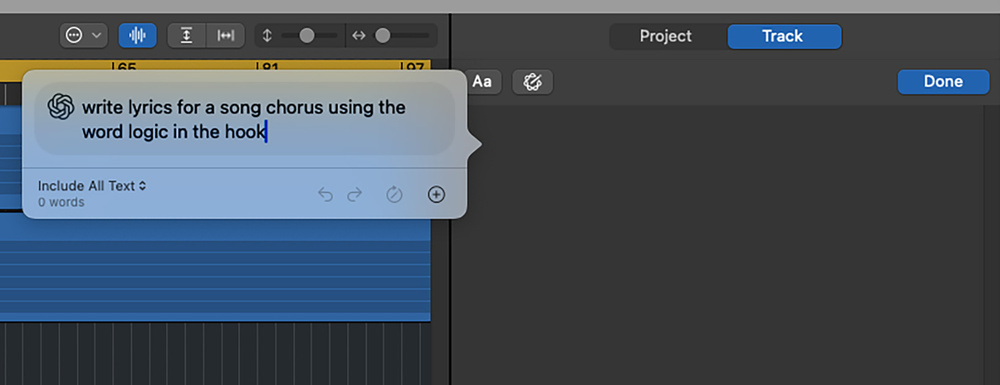 On a suitable host, you can now access ChatGPT directly within Logic’s Notepad feature.
There are plenty of use cases for this technology, but one obvious example would be to generate ideas for song lyrics. Yes, we will all draw our own personal lines in the sand when it comes to AI‑generated lyrics (as opposed to human‑created lyrics), but you can lean into this technology in a more subtle way, such as using ChatGPT as a rhyming dictionary or thesaurus. I’ll leave the AI debate for another day, but with the convenience of never leaving Logic, you can now type text questions or prompts as you might do directly into the ChatGPT website.
Best Of The Rest
There is an extensive list of all the changes 11.2 brings on Apple’s website (https://support.apple.com/en-us/109503). Space precludes mentioning all of these, but a few items caught my attention, so I’ll finish with a personal ‘best of the rest’ list. For example, there is now a Search & Select option to find tracks by name or number, which is useful in larger, more complex, projects. You can now save the Undo History within a project and, while it doesn’t recall everything (plug‑in changes, for example), it’s a useful addition. The Toolbar’s Master Volume slider can now be toggled to show an output meter, which many will find useful. If you use the Chord Track, individual chords can now be moved along the track even when the track is closed. You can also import Chord Track contents from another project. For those working with surround or spatial audio projects, the pan control now offers an Elevation slider, allowing you to adjust the vertical positioning of a signal.
Finally, as with most Logic updates, there are new sound packs available for downloading. For 11.2 these are Magnetic Imperfections (lo‑fi soul inspired), Dancefloor Rush (drum & bass synths and drums) and Tosin Abasi (the metalhead inside me particularly liked this last one).
Apple are continuing to nudge Logic Pro forwards rather nicely, even between the whole number updates.
Nudge, Nudge
Apple are continuing to nudge Logic Pro forwards rather nicely, even between the whole‑number updates. With 11.2, as well as the obvious highlights, there are a huge range of more minor refinements and tweaks designed to make everyone’s Logic experience a little slicker or a little deeper. A worthwhile download that’s full of incremental improvements and all delivered without charge to existing users. What’s not to like?
Pros
- Improved Stem Splitter feature.
- Flashback Capture for retrospective audio recording.
Cons
- Direct ChatGPT access from within Logic; pro or con?
Summary
Logic Pro 11.2 brings a wide range of new, improved and fixed features to their flagship DAW. It’s great to see Apple adding value and, for existing users, the update is free.
Information
Free update, or £199.99 including VAT.
Free update, or $199.99.