

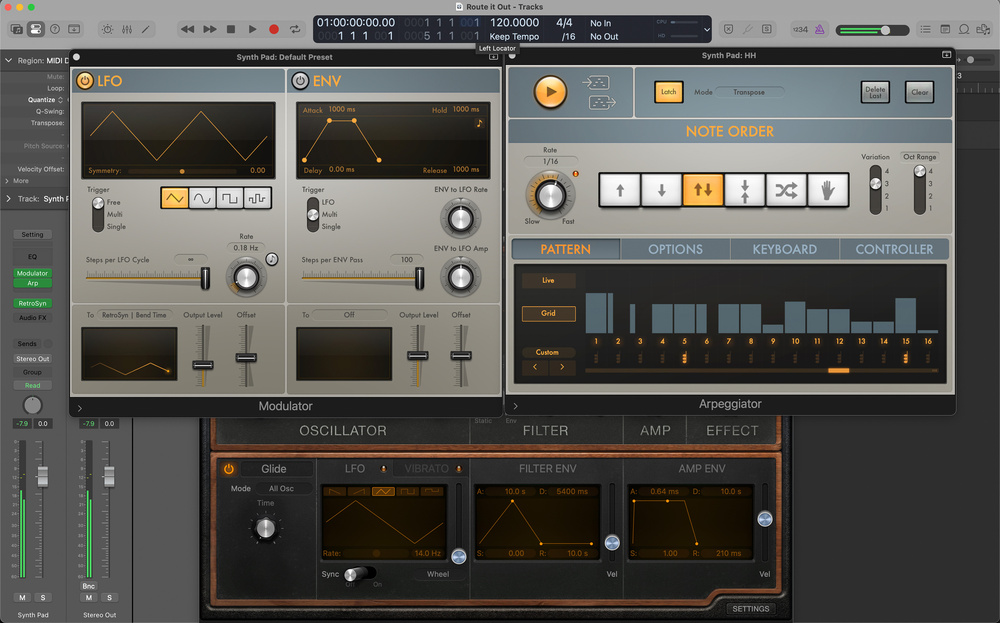
 Here, Logic’s Arpeggiator plug‑in is triggering notes in Retro Synth, while the Modulator MIDI effect is modulating the amount of Glide.
Logic’s MIDI plug‑ins are your key to instant inspiration!
When Logic Pro 11 was released back in May 2024, it introduced a wealth of new features, many of which have already been covered in these pages. However, some of the more subtle, but no less powerful additions may have flown under the radar. Among these are significant improvements to MIDI routing, which could open up creative possibilities for producers.
In this workshop, we’ll explore some examples of routing and how to extract editable MIDI data from plug‑ins like Arpeggiator. We’ll discuss why this is useful, and how these new tools can complement existing functionality to add depth and colour to your production palette.
MIDI En Place
Let’s start by creating a synth sound to be triggered by Arpeggiator. For a warm, analogue‑style pad, I chose Retro Synth in Analog mode and loaded the Dark Swell Pad preset. It’s rich and lush, but to make it more suitable for arpeggiation, I made a few tweaks. First, I switched the filter to a low‑pass 12dB/octave ‘Creamy’ style for added brightness without sacrificing low‑end warmth. Next, I increased the filter envelope attack speed whilst simultaneously emphasising it by raising the Env parameter in the filter section by a good notch.
After that, I shortened the attack in the amp envelope to allow 16th‑note arpeggiations to pop through more clearly. Then, whilst playing about, I started tweaking the Glide parameter, and as I did so, enjoyed the effect of the extra movement laced with a little unpredictability. This inspired me to automate this portamento‑style parameter using the Modulator plug‑in.
Routing For Change
Modulator is a gamechanger when it comes to expanding the functionality of any instrument and/or subsequent processor, as Paul White explained in his December 2019 workshop. In this case, I wanted to use it very simply to route a low‑frequency oscillator to subtly modulate the amount of glide in Retro Synth.
First, I inserted an instance of Modulator in the first MIDI Effect slot, just above the Retro Synth plug‑in on the Software Channel Strip in the Inspector. The left side of Modulator is dedicated to the LFO and, towards the bottom of the GUI, you can click‑hold on the ‘To’ pop‑up menu to patch the LFO towards its destination. I selected Learn Plug‑in Parameter, which allows you to simply click on any automatable parameter of any plug‑in inserted below on the same channel strip. With both Modulator and Retro Synth open, I clicked on the Glide parameter. They were...
You are reading one of the locked Subscribers-only articles from our latest 5 issues.
You've read 30% of this article for FREE, so to continue reading...
- ✅ Log in - if you have a Digital Subscription you bought from SoundOnSound.com
- ⬇️ Buy & Download this Single Article in PDF format £0.83 GBP$1.49 USD
For less than the price of a coffee, buy now and immediately download to your computer, tablet or mobile. - ⬇️ ⬇️ ⬇️ Buy & Download the FULL ISSUE PDF
Our 'full SOS magazine' for smartphone/tablet/computer. More info... - 📲 Buy a DIGITAL subscription (or 📖 📲 Print + Digital sub)
Instantly unlock ALL Premium web articles! We often release online-only content.
Visit our ShopStore.