

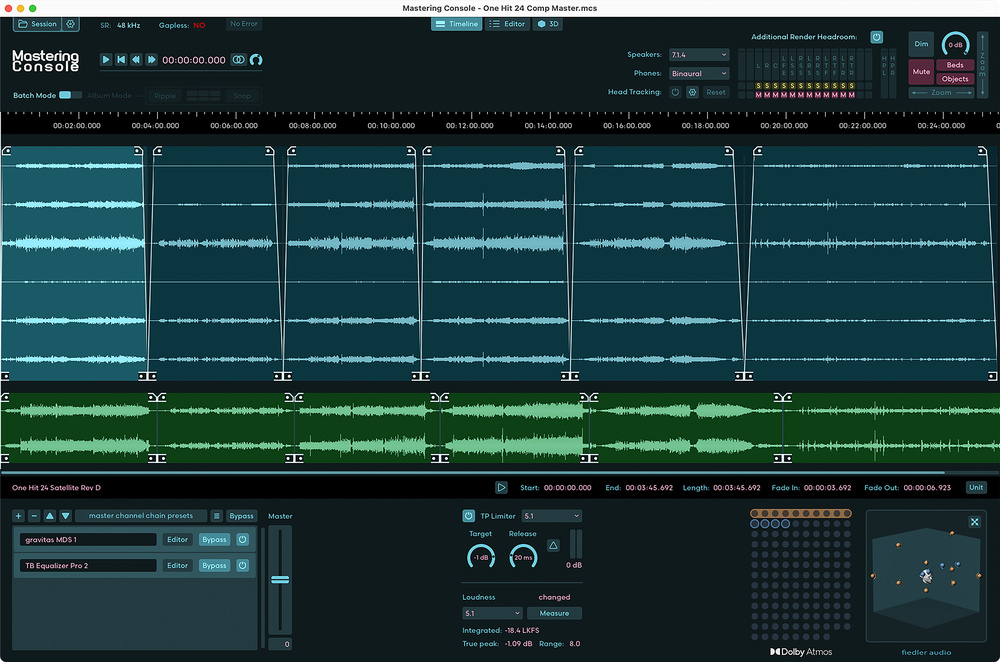
 Screen 1: The main Timeline window. Note the support for working on multiple files, and for Atmos‑capable plug‑ins.
This major update to Fiedler’s immersive audio mastering suite could revolutionise your Atmos workflow.
My review of Fiedler Mastering Console version 1 was published as recently as SOS December 2024, and the fact that I’m already writing about a version 2 indicates both that Fiedler Audio seem able to move very quickly, and that this new version is a very significant advance. In fact, Fiedler describe it as an entirely new product — and I wouldn’t argue with that.
Fiedler Audio Mastering Console (or FMC, as I’ll refer to it from here) is a Dolby Atmos production tool that aims to provide an all‑in‑one fix for a workflow quirk that’s inherent in Atmos signal routing: within, say, a Pro Tools Atmos mix session, it’s not possible to apply global EQ, loudness adjustment, compression or limiting, or anything else, to an entire Atmos mix. This arises because an Atmos session typically comprises beds and objects. Beds are conventionally panned elements spread, typically, over a 7.1.2 channel width, and objects are discrete elements that are panned according to dynamic metadata that defines their intended position in space.
Notwithstanding that multi‑channel EQ, compressor or limiter plug‑ins that can be inserted on a 7.1.2 bus are somewhat niche, such a plug‑in wouldn’t ‘see’ the object channels, because they’re separately routed to the Dolby Atmos Renderer (there can also be up to 128 of them!). This isn’t simply an inconvenience, though; it’s a significant issue because, for example, it makes aiming for a specific mastered loudness level or an overall tonal balance decidedly tricky. It makes fade‑ins and fades‑outs complicated too because they potentially need to be applied to beds and each object individually. FMC aims to fix all this, and more.
Orientation
On launch, FMC 2 presents its Timeline window, which is where most of the fundamental mastering functions live. To begin a mastering session, the first step is to import an Atmos ADM (Audio Definition Model) file, a multi‑channel BWF WAV package that carries the Atmos metadata, and is the Atmos format output of the Dolby Atmos Rendererer that hangs off the end of the DAW Atmos mix session. Screen 1 shows six ADM files imported, because FMC 2 can master multiple files in one project. Despite the imported Atmos audio shown comprising a 7.1.2 bed with multiple objects, the display in the timeline shows ‘only’ a 5.1 channel width. While this may seem strange, it’s not remotely an issue in practice, and there’s sense in it: the convention is that loudness measurement of Atmos ADM files is determined on a 5.1 downmix.
Along with the Atmos ADM shown in Screen 1’s Timeline window, I’ve also imported six stereo files (shown in green) that were rendered and output by the Dolby Atmos renderer at the same time as the ADM files. Mastering for Atmos often means creating stereo companion files and FMC 2 can handle both. This makes sense, as it will help ensure consistency across mastered stereo and ADM exports.
There’s an option to consider here, though, because an alternative workflow is to import only the Atmos ADM and then, if stereo companion files are required, have FMC 2 render and export them. That was my preference initially, but I can see that the extra flexibility offered by importing separate stereo files, in particular the possibility of applying different processing (EQ, compression, loudness, limiting, etc) to stereo renders, is often likely to win the day. Still, importing separate ADM and stereo files, as in Screen 1, does enable me to illustrate the trim features and in/out fades that can be applied. The ADMs in the screenshot have been trimmed at both beginning and end, and had in/out fades applied (nonlinear fade curves are available), while the stereo files are...
You are reading one of the locked Subscribers-only articles from our latest 5 issues.
You've read 30% of this article for FREE, so to continue reading...
- ✅ Log in - if you have a Digital Subscription you bought from SoundOnSound.com
- ⬇️ Buy & Download this Single Article in PDF format £0.83 GBP$1.49 USD
For less than the price of a coffee, buy now and immediately download to your computer, tablet or mobile. - ⬇️ ⬇️ ⬇️ Buy & Download the FULL ISSUE PDF
Our 'full SOS magazine' for smartphone/tablet/computer. More info... - 📲 Buy a DIGITAL subscription (or 📖 📲 Print + Digital sub)
Instantly unlock ALL Premium web articles! We often release online-only content.
Visit our ShopStore.