With its compact footprint and the option to run from a built‑in battery, the ProFX10 Go is Mackie’s most portable mixer ever.
The Mackie ProFX10 Go is a compact mixer that can also double as a 24‑bit/192kHz USB recording interface, and which also incorporates bidirectional Bluetooth to allow audio streaming to and from a nearby mobile device. However, mobility is the USP here, with the ProFX10 Go having the unusual ability to run on battery power. A 12V power adaptor is also included, and the replaceable lithium battery is automatically recharged when this is connected. Overall weight is 2.7kg with the battery fitted, and the size is a rucksack‑friendly 70 x 270 x 292mm.
The GB‑10 rechargeable battery ships with the mixer as standard, and Mackie say that it provides for up to eight hours of use between charges. As well as recharging when the mixer is plugged into mains power, the battery can also be charged outside the mixer.
With the ProFX10 Go, Mackie have made it possible for phone calls to be relayed via Bluetooth with a Mix Minus feature so that the caller doesn’t hear themselves repeated, making the mixer suitable for live streaming and podcasting phone‑ins. There are also digital effects, employing what Mackie term their GigFX+ processor, which provides reverbs, delays, chorus and so on. Effects presets can be saved and recalled for live performance.
There are three different USB recording modes. Standard mode records the full mix with effects, Loopback mode brings in computer audio along with the mix for streaming, and basic interface mode uses channels 1+2 as the inputs without recording the effects. A separate USB 3+4 return can be brought into channels 7+8 — useful for incorporating software instruments or other DAW audio. Used with my Mac, the mixer shows up as a class‑compliant 2‑in/4‑out interface. A licence for Tracktion’s Waveform OEM recording software is included.
Channel Hopping
As with most small mixers, there are rather fewer mic preamps than input channels — in this case one each for the first four mixer channels, which also benefit from TRS insert points and a ‘Level Set’ LED for basic metering. Channels 1 and 2 feature one‑knob compressors and use combi XLR/jack connectors, with Hi‑Z switches allowing for instrument use with the jack inputs. Channels 3 and 4 have separate XLR and line input jacks. The mic preamps use Mackie’s proven Onyx design and offer up to 60dB of gain, with switchable 100Hz low‑cut filters and global 48V phantom power switching.
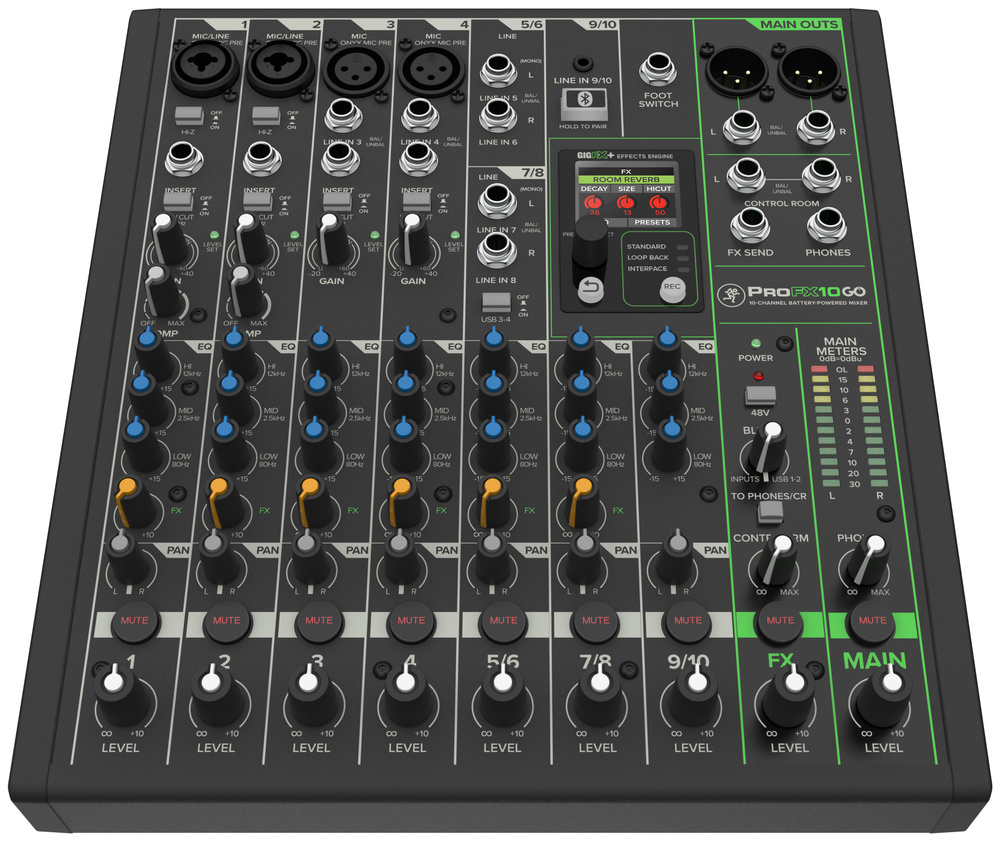 The ProFX10 Go can accommodate up to four microphones, with the first two channels able to accept instrument signals on combi jacks. There are two stereo USB returns, a high‑quality digital effects section, a Bluetooth input and separate outputs for the main mix and control room/headphone out.
Channels 5+6 and 7+8 are stereo channels, but can operate in mono using the odd‑numbered inputs. As mentioned, channels 7+8 can also accommodate USB outputs 3+4, with selection made using a switch. Channels 9+10 handle the stereo Bluetooth input (this section includes a pairing button for connecting devices), though it can also take a stereo analogue feed from a mini‑jack. All channels have a fixed‑frequency three‑band EQ, a pan control and a level pot. Channels other than 9+10 include an effects send, but there are no monitor sends and no solo or PFL provisions. There are large mute buttons on all the input channels, the effects return and the main mix. A headphone output provides personal monitoring.
The master section is clearly set out, with separate strips for the main mix output and the effects section. Rotary level controls again take the place of faders, with further level controls for the control room and headphone outputs. A Blend control mixes the Control Room output with the USB 1+2 return, which can also be sent to the headphone/control room outputs if desired. LED metering is provided on the main output. The main outputs are presented on both XLRs and quarter‑inch TRS jacks, with a further pair of jacks accommodating the control room out, one more for the headphones, and a final jack for connecting a footswitch for bypassing the effects. The effects send mix has its own output, too, so you can send to an external processor if required. However, there is no dedicated aux return, so you would need to redeploy one of the other inputs.
Effects
The GigFX+ panel is where you control the effects, and I’ve saved this bit ’til last as it is quite sophisticated for a mixer of this size! It benefits from a small but clear colour LCD which aids navigation and depicts the editable parameters (as virtual knobs) for the currently selected effect. A push/turn encoder plus a ‘back’ button handle effects selection and parameter selection/adjustment. Up so six effect presets can be saved for instant recall, and the treatments on offer largely comprise useful delays, echoes and reverb‑type effects (including a combined delay and reverb option), along with a few modulation effects. All have simple controls similar to what you might expect from a guitar pedal, and the quality of the effects is excellent; the reverbs are plenty good enough for studio use.
Finally, the GigFX+ panel is also where you’ll find a Rec button for stepping through the different recording modes.
In Use
In my tests the mixer worked perfectly, both running from its PSU and from battery. The preamps are clean‑sounding, which is what you’d expect from Mackie’s Onyx circuit, and the EQ is workmanlike and effective — with the mid frequency set at 2.5kHz and shelving filters at 80Hz and 12kHz, there’s plenty of scope to address most common tonal issues. The USB interfacing came to life as soon as I selected the interface in my Mac’s Audio Settings, and recording worked without a hitch.
The ProFX10 Go is actually an extremely versatile little mixer that should hold a special appeal to those doing live streaming and podcasts.
There are many less costly small mixers available if you don’t need the battery power, and if your main application is live music mixing, you may want more mixer channels than the ProFX10 Go offers. But what you get here are additional features that make the ProFX10 Go effective for general‑purpose mixing and also as an audio interface in situations where there is no mains power. It also holds appeal for desktop use as an audio interface, where its built‑in effects and extra USB return could come in very useful. The Blend control and phone‑friendly Bluetooth connectivity obviously lean towards streaming and podcasting, too. So, while the lack of PFL/solo buttons and monitor send controls, as well the use of knobs rather than faders, could be offputting for those wanting a traditional ‘front of house’ desk, the ProFX10 Go is actually an extremely versatile little mixer that should hold a special appeal to those doing live streaming and podcasts. It’s rugged, easy to use and delivers the high standard of sound quality that we’ve come to expect from Mackie.
Pros
- Low noise and distortion.
- Versatile USB interface features.
- Bluetooth for phone interviews and music streaming.
- Excellent effects.
Cons
- Battery powering comes at a cost.
- Knobs rather than faders for channel and master level control.
- No monitor send or PFL/solo controls.
Summary
With Bluetooth connectivity, USB interfacing, a powerful effects section and the option of running off‑grid, the ProFX10 Go offers a huge amount of flexibility for content creators, DJs, podcasters and more.
Information
When you purchase via links on our site, SOS may earn an affiliate commission. More info...