

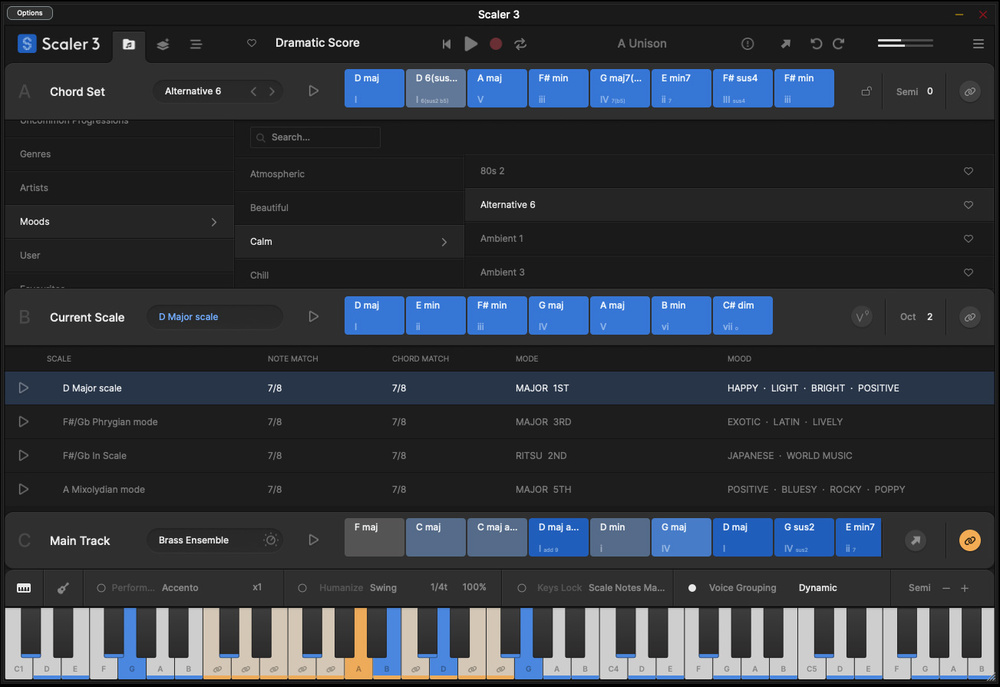
Scaler has evolved into a fully‑fledged compositional toolkit.
If your compositional process often starts with chords, and you are open to the concept of a software‑based writing assistant, then Scaler may well be a product you are familiar with. However, five years after Scaler 2 was released, Scaler Music have now released Scaler 3 and, without wishing to issue a spoiler alert, I do think it’s been worth the wait. So, what’s new in Scaler 3?
The Scale Of The Project
From a practical perspective, Scaler operates as both a standalone application and as a plug‑in. At its heart, Scaler — in both its v1 and v2 iterations (see the December 2018 and September 2020 reviews) — is perhaps best thought of as a chord sequence explorer, allowing you to experiment with chord choices, guiding you on chord selection, suggesting chord alternatives/substitutions (including more harmonically complex choices), chord voicings, and letting you venture into chords that might lie outside your chosen key/scale. Those chord sequences could be easily auditioned and, when you settled on a chord sequence you thought was promising, MIDI could be dragged and dropped to your DAW for further work.
Scaler 3 is still all of the above. However, there are two very significant changes. First, an impressive redesign of the UI organises all this core ‘creating chord progressions’ functionality in a much clearer fashion. Second, and just as impressive, Scaler 3 now goes way beyond chord sequence exploration and into the realms of ‘compositional tool meets MIDI sequencer’.
Three For Three
In terms of the UI, Scaler 3’s functionality is now arranged across three main pages — Browse, Create and Arrange — accessed via the tab buttons located top left. The Browse page, which itself is divided into three sections, will be familiar to longstanding Scaler users. The Chord Set and Current Scale panels provide alternative ways to kickstart your chord selections, and provide a very impressive collection of genre/mood/artist chord sets that could keep your songwriting inspired for a considerable time. Chords from these panels can then be dropped into the Main Track panel to build your own chord sequence. Auditioning chords within each panel is made easy as each features a ‘bind’ button letting you link that panel to your MIDI keyboard and mapping each full chord to a single key for instant triggering.
Switching to the Create page keeps the Current Scale and Main Track options visible but the central body of the UI then provides five sub‑panels offering alternative chord exploration approaches. Circle of Fifths gives you an interactive way of exploring that music theory concept to find chords that work together, while Modulation provides a very clever toolset to explore modulation pathways between your Main Track chord sequence and a target destination scale. If your Music Theory 101...
You are reading one of the locked Subscribers-only articles from our latest 5 issues.
You've read 30% of this article for FREE, so to continue reading...
- ✅ Log in - if you have a Digital Subscription you bought from SoundOnSound.com
- ⬇️ Buy & Download this Single Article in PDF format £0.83 GBP$1.49 USD
For less than the price of a coffee, buy now and immediately download to your computer, tablet or mobile. - ⬇️ ⬇️ ⬇️ Buy & Download the FULL ISSUE PDF
Our 'full SOS magazine' for smartphone/tablet/computer. More info... - 📲 Buy a DIGITAL subscription (or 📖 📲 Print + Digital sub)
Instantly unlock ALL Premium web articles! We often release online-only content.
Visit our ShopStore.