

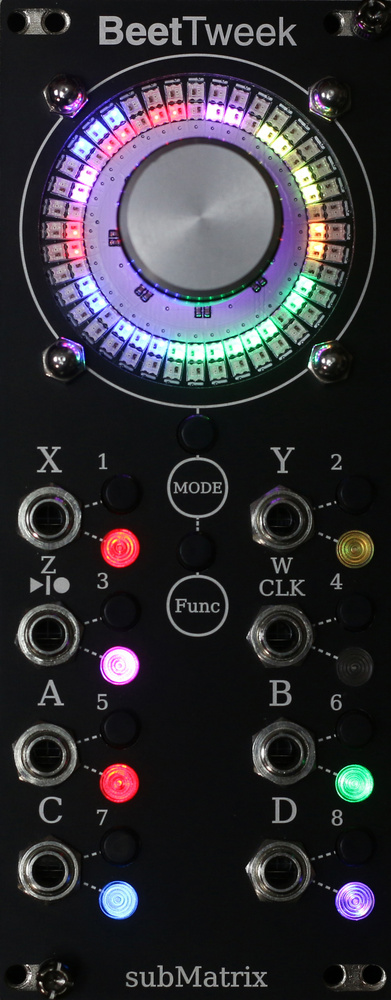
Torque is not a parameter you encounter very often in modular synthesis. And yet the BeetTweek from subMatrix is full of it. The module centres around the rather spectacular force‑feedback knob, which pulses with haptic intentions and turns with remarkable friction. With a twist, it can spin beats, trigger accelerations and forge gravitational pathways. The dual halo of 80 LEDs is stunning, and the interplay between the knob and illumination is thoroughly exciting. You can literally feel the weight of potential in your fingers.
The BeetTweek is a haptic feedback controller with 10 modes of operation, four inputs, four outputs, buttons, LEDs and a confusing array of actions, functions and augments. I’ve never come across anything quite like it, but what’s important is how much of this torque, of this frictional, haptic action, we can get to somewhere useful. The documentation is long, complex and difficult to digest. It took me a long time to tease out what’s going on amongst the knob angles, drive torque and angular velocity. It would really benefit from a crib sheet of basic functions and step‑by‑step instructions. However, with some perseverance, the BeetTweek does begin to reveal its secrets.
The first mode is called Turn Table mode and is very different from the rest in that it’s an audio and sampling effect, whereas the others are mostly about generating modulation. The halo of LEDs becomes a piece of recordable vinyl defined by eight markers around the knob and one revolution of recording time. Hit Record, and you can imprint any audio or CV onto the circle as it turns. Then it gets really interesting. You can play it forward, you can play it backwards, but you can also use the knob to scrub through the recording like a scratch DJ. The knob has this uncanny weight to it, and if you give it a little spin, it will maintain that speed, forwards or backwards, changing the pitch of the recording as you go.
It will also do sound‑on‑sound recordings, so you can layer sound over the top on each revolution. You can swap between single recording, overdub and playback via CV by patching certain voltages into the CV input. This feels a bit unwieldy at first, but it becomes quite powerful as you automate grabbing recordings alongside knob twiddling. It’s fun, fascinating and a nicely lo‑fi approach to sampling in your modular that gets very crunchy as you slow down the spin.
In Torque‑Friction mode, the force‑feedback engine goes into full flight. The knob is freely movable, but as you add voltage to the Torque input, it begins to spin through your fingers with its own energy. Add voltage to the Friction input, and it acts against the Torque to slow it down. You can act against both of these forces with your fingers in a fight with what feels like a demon‑possessed knob. At the four outputs, you get modulation from the knob’s position, the angular velocity, and the level of drive torque of the knob acting against the other forces. It’s all visualised on the halo and quite mind‑bending. Patch in some LFOs or other signals, and you have all sorts of shapes being created that you can manipulate by applying your fingers to the knob.
There are a couple of Spring modes where you turn the knob like loading a spring, and when you let go it spins back to its original position. Great for pitch bending or bursts of momentary modulation.
Orbit mode presents you with a particle that’s gravitationally attracted to an LED you move around the circle. Using force and motion, you can flick the particle through space, or, by reversing the fields, chase it about the place.
In these modulation modes you physically feel the forces acting on the knob. It’s brilliantly weird and you just want to keep fiddling with it all the time. Meanwhile, the four outputs are generating voltage, based on angles, drive, velocity and acceleration. Sometimes it feels like the amount of energy put into the knob doesn’t always translate into much more than an LFO or a parameter shift, but they are certainly achieved in ways you hadn’t come across before.
There’s a lot more in here, like some great clock modes where you can twist to set a speed it will maintain until you slow it down with your fingers. Or you can sync it to an external clock and then twist in smooth speed changes before releasing it back to the original tempo. There’s a mode where you can store voltage values around the halo and wind through them like a melody machine. It even has a mode that outputs chords in V/oct and can act as an oscillator. I should also mention that all modes support gesture recording where knob movements can be captured and looped.
With a bit of investigation and experimentation, you could find some amazing possibilities in this unique Eurorack controller.
There are elements I still don’t fully grasp, and I often find myself wondering, after a lot of fun interaction, what I would actually use them for in the context of my rack. At over $600, it’s not a casual purchase, and you probably need to have an idea about its purpose before making that investment. I’m left knowing it’s an extraordinary piece of technology that offers more than I can understand, but I’m unsure whether it has the killer feature that will make it invaluable to my workflow. However, with a bit of investigation and experimentation, you could find some amazing possibilities in this unique Eurorack controller.