

With a quartet of excellent preamps and 32‑bit floating‑point recording, Tascam’s FR‑AV4 could be a videographer’s dream...
Building on the success of the company’s two‑channel FR‑AV2 recorder (reviewed in SOS June 2025), Tascam have now released a larger, four‑input recorder based on the same impressive technology. Like its smaller sibling, the FR‑AV4 is strongly geared towards those working with digital cameras, allowing sound to be recorded independently on four high‑quality audio tracks for post‑production and remixing, with perfect synchronisation guaranteed thanks to the machine’s comprehensive timecode connectivity options. But, of course, it can also be used independently as a four‑track audio recorder.
Physical Form
The extremely compact FR‑AV4 measures 184 x 42 x 130mm (WHD) and, thanks to its robust fibreglass casing, weighs just 756g when four AA batteries are installed (it’s 660g without them). The machine can be configured to work with alkaline, Ni‑MH or lithium cells, from which it draws a maximum of 5.4W. With alkaline batteries, the worst‑case operating duration (with four phantom‑powered mics, and both the HDMI connection and headphones in use) is around 1.5 hours. That rises to four hours with lithium cells, while recording just two inputs without phantom power, and with no headphone or HDMI connections, increases the operating time to 9 hours for alkaline and 17 hours with lithium batteries.
Helpfully, the four AA batteries are accommodated in a plastic holder cartridge which inserts into the rear of the unit behind a screw‑down flap. Spare holders are available as accessories, to enable fast battery swaps if required, although I imagine most professional users would employ the internal cells as a redundant backup supply and power the unit primarily from its USB‑C connector from a dedicated external supply of some sort, to give much longer operating durations. An optional mains power adaptor is also available, and that connects via USB.
A Kensington slot (to accommodate a Kensington lock tethering cable) is available on the rear panel, and all four corners of the unit feature pillars for strapping to support the unit if placed in a protective carry‑bag. Both the top and bottom panels of the FR‑AV4 feature threaded quarter‑inch inserts to allow mounting on tripods, cameras or other standard grip equipment.
Like its smaller sibling, the FR‑AV4 can record to its memory card at sample rates of 48, 96, or 192 kHz and in either 24‑bit linear or 32‑bit floating‑point files using the WAV (BWF) format. There’s also an option to record in MP3 format at 48kHz, with bit rates of 128, 192, 256 or 320 kbps. All four input channels are recorded individually, along with a stereo mix, usually as separate mono or stereo files (depending on the channel‑linking status). However, there’s an option to record all six channels as a single polyWAV if that’s preferred.
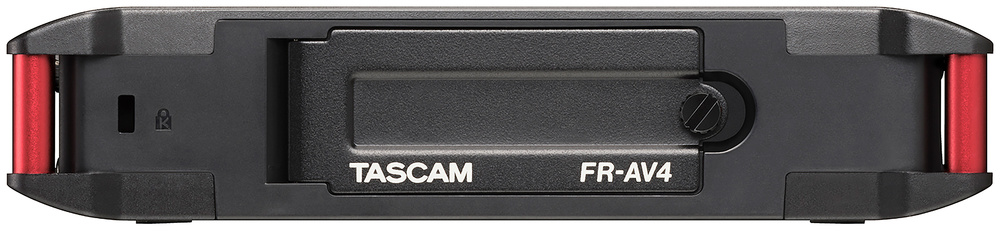
The single SD card slot is protected inside the screw‑shut battery compartment.
I was surprised, given the larger size of the new recorder, that Tascam have opted to provide only a single memory card slot. The microSD format may be convenient, but on a professional machine I’d have preferred dual slots (as on, for example, my own Zoom and Nagra recorders) for redundant backup purposes and, potentially, the ability to record to different formats simultaneously. But at least the FR‑AV4 shares the same automatic file closing system as its sibling, which prevents the loss of recorded audio in the event of power failure. The SD slot accepts a microSD, microSDHC or microSDXC card (a maximum capacity of 512GB is currently supported), and there’s a welcome improvement over the FR‑AV2 too: the card slot is now much better protected, behind the screw‑down battery cover at the rear of the unit.
Connectivity
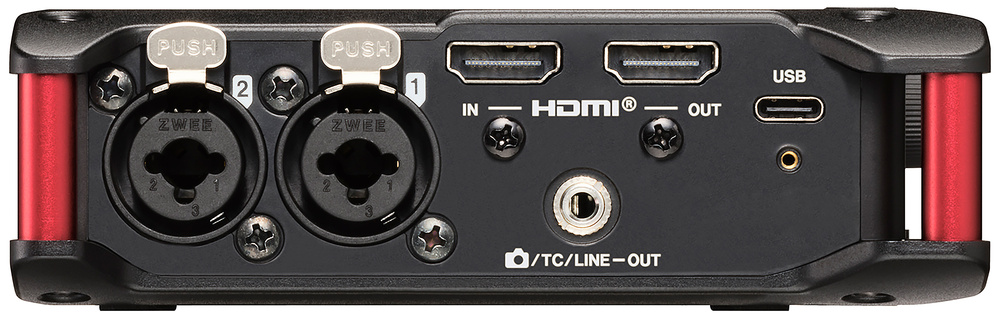
The FR‑AV4 has an HDMI input and output, which caters for sync as well as replacing the audio in the video feed that passes through it.
The left‑hand side panel features combi XLRs for inputs 1 and 2, plus a USB‑C connector and a 3.5mm output socket that can be configured to feed unbalanced stereo audio or linear timecode to a camera or timecode transmitter. Uniquely, in this market, there’s a pair of HDMI connectors to provide an HDMI input and output. The HDMI input is provided principally as a convenient means of receiving timecode and record/stop instructions from a connected camera, and the video content (2k, 4k and 8k formats are all supported) is passed straight through to the HDMI output for onward connection to a monitor screen or video recorder. Helpfully, the recorder’s internal audio sources (channels 1+2, 3+4, or the stereo mix) can be inserted into any of the four stereo audio channels of the HDMI output stream, replacing any original audio signals being conveyed by it. The potential benefits of that should be obvious, although I was surprised to discover that any existing audio embedded in the HDMI input stream cannot be extracted and recorded by the FR‑AV4.
The recorder’s internal audio sources... can be inserted into any of the four stereo audio channels of the HDMI output stream, replacing any original audio signals.
Tascam’s user manual explains how up to four FR‑AV4s can be daisy‑chained, using the HDMI connections to share timecode synchronisation and start/stop commands, and how the stereo mix from each machine can be embedded in the HDMI stream passing between them to allow monitoring at a final destination. I’m sure this feature will be useful in some situations, though I was disappointed that the same HDMI connection can’t be employed as single‑cable hookup to a second recorder for a safety backup. Perhaps a future firmware update will add the ability to record from the HDMI stream in the same way that it can record from its USB input?
On the subject of USB, I’ve already mentioned that the USB‑C connector can be used to power the unit, but it supports other functions too. First, it allows the exchange of recorded audio data, with the unit working as a remote storage device with Windows 10/11 and macOS 13/14/15 computers. Second, the FR‑AV4 can also be configured to serve as a 6‑in/2‑out USB audio interface (with local recording to the SD card, if required), although it only supports sample rates of 48 or 96 kHz in this mode. (An ASIO driver is available for Windows users). Finally, it is also possible to convey timecode for NLE/DAW synchronisation over the USB connection.
On the right side panel, alongside combi XLRs for inputs 3 and 4, you’ll find a headphone monitor output, an input jack for a camera’s audio signal, and timecode in/out mini‑jacks.
Over on the right‑hand side panel are two more combi XLRs for inputs 3 and 4, plus a pair of 3.5mm sockets for linear timecode connections in and out, supporting all standard video frame rates. A third mini‑jack socket accepts a stereo unbalanced mic or line input from a camera or other source, which can be selected to record in place of XLR inputs 3 and 4. Plug‑in power of 2.5 or 5 Volts is available here, if required, too. A fourth mini‑jack socket provides a monitoring headphone output which is controlled by a rotary volume control immediately above it. The unit’s power is turned on and off via an almost flush spring‑loaded slide switch in front of the headphone socket, which has to be held against the spring for a few seconds (to avoid accidental power‑up/down).
Technology
As with its smaller stablemate, the FR‑AV4’s four XLR inputs feed Tascam’s new “ultra low‑noise HDDA” mic preamps. These employ sophisticated discrete circuitry to achieve an EIN figure of better than ‑127dBu, which is on a par with many high‑end studio mic preamps as well as most of the current crop of comparable high‑quality portable recorders.
The maximum accepted input level is +4dBu via the XLR connections, with an input impedance of 2kΩ, and +24dBu via the TRS terminals (8kΩ). A menu page allows each channel’s recording source to be selected from XLR (mic), TRS (line), mini‑jack (Ext), or USB audio. Phantom power can be activated for each channel individually and selected between 24 or 48 Volts. The 3.5mm stereo input socket can accommodate up to +1dBV, with a 6kΩ input impedance (falling to 1.6kΩ if plug‑in power is enabled).
As with the FR‑AV2, each of the four preamps feeds dual high‑/low‑gain converters, whose outputs are combined to deliver 132dB of dynamic range that’s captured using 32‑bit floating‑point recording. As with all 32‑bit floating‑point recorders, it is technically possible to overload the mic preamps themselves (for example, by placing a high‑output mic very close to an extreme sound source), but it’s an unlikely occurrence in the kinds of applications for which the FR‑AV4 is intended, and the key benefits of this dual‑converter technology are really its incredibly low noise floor and that it permits the user to optimise the recorded signal level in post‑production, instead of having to spend time doing so in the field.
Operation
In practical use, I found the FR‑AV4 to have a fractionally lower noise floor than my own Zoom F8n Pro, and it coped perfectly with a range of typical location‑recording cabled and radio mics, including DPA lavaliers and a variety of directional and shotgun mics from Schoeps, Neumann, Sennheiser, and Rode. The headphone amplifier is optimised for low‑impedance headphones and only provides a maximum of 50mW per channel, so careful choice of headphones is required — I mostly opted to use Sony MDR7509s (24Ω) which I found were a little louder than the Sennheiser HD25s (70Ω) that I usually prefer.
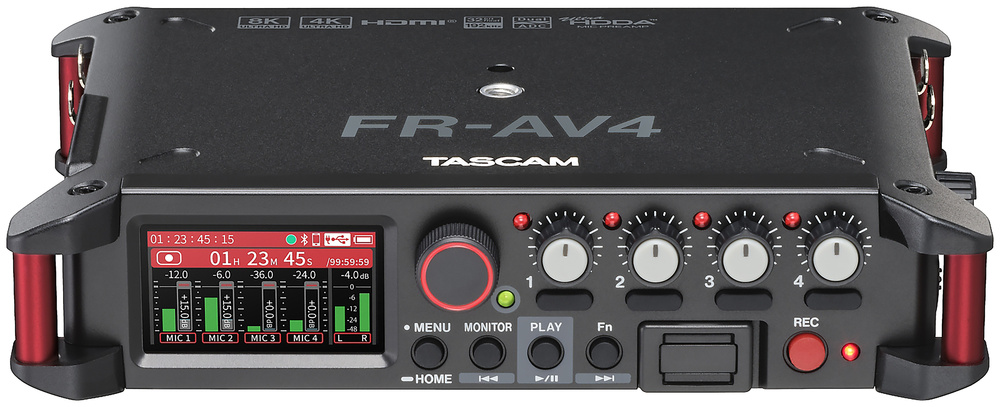
The front‑panel controls are much as would be expected of any portable recorder, and almost identical to the FR‑AV2 of course. The latter’s four soft keys along the bottom edge of the display screen have given way to a more conventional encoder‑driven menu system, but the core menu structure and functionality are actually very similar. A rectangular colour LCD touchscreen is located on the left of the front panel, and although some elements can be selected by touch, most actions and functions are controlled through a dedicated Menu/Home button and associated rotary encoder.
Across the top at the right side of the panel are four small rotary input gain controls (0‑60 dB) with black channel‑access/monitor buttons below and red peak‑overload LEDs above (illuminating when the input signal exceeds ‑2dBFS).
The transport controls are slightly unusual, in that there’s no Stop button (what you might assume to be the stop button is actually a socket for the optional Bluetooth adaptor!). The Record button is separated from everything else at the far right, making it very easy to locate by touch alone, and recording is both initialised and stopped by pressing this button, with an adjacent red LED indicating the current status. A pre‑record buffer is enabled by default, meaning that each recording captures a few seconds of audio before the record button is pressed, to ensure that nothing is missed. The buffer size varies with the sample rate, providing seven seconds of pre‑recording at 48kHz, five seconds at 96kHz and just two seconds at 192kHz.
Four buttons to the left of the Bluetooth adaptor socket are labelled Function, Play, Monitor and Menu. I’ve already mentioned the Menu button, and the Monitor button accesses a menu page which determines which signals are routed to the headphones. The Function button is user‑programmable to access a wide selection of menu screens or features, including mark/slate (the default), mixer page, phantom power, headphone volume, Bluetooth functions, SD card directory, timecode functions, HDMI, and the just added auto‑mix system (see below). When files are being played back (started and stopped by pressing the Play button), the Monitor and Function buttons become rewind and fast‑forward controls.
As with the FR‑AV2, remote control is possible — in fact you can control multiple Tascam recorders of different models from the app — but this requires the purchase of an optional Bluetooth adaptor.As intimated above, Tascam’s optional AK‑BT2 Bluetooth adaptor can be installed in the front panel (maximising the usable range) for wireless timecode transmission/reception (compatible with Atomos timecode devices), as well allowing remote stereo audio monitoring, BEXT and iXML file metadata entry, and providing full remote‑control functions via Tascam’s clever Recorder Connect app (for both iOS 16/17/18 and Android 12/13/14 operating systems).
When I received the review FR‑AV4 model it was running on the launch v1.01 firmware, but Tascam released v1.1 shortly afterwards and updating the unit was as simple as downloading the dedicated updater app and plugging the unit in to a computer via its USB‑C port. The headline news for this new firmware version is that it adds an auto‑mixer (constant gain) function, but it also fixed a few bugs, and improves usability in various minor, but nevertheless helpful, ways. The auto‑mix function does exactly what it says, very effectively, and the relative weighting given to each of the four input channels can be adjusted as required, which is nice. The only minor limitation of the system is that it only operates at the 48kHz sample rate, but I can’t see that being a deal‑killer for anyone.
Naturally, a lot of information is presented on the bright and sharp LCD screen, but it’s not overly cluttered and colour coding makes things easy to understand. There are two main operating screens which are swapped by side‑swiping, with one showing the stereo mixer and output functions, and the other the input gain settings, timecode and SD remaining time. Both have channel and stereo meters scaled from ‑48 to +6 dBFS, coloured in green up to ‑12 (the mid‑point), yellow to ‑6, and orange above that — an arrangement which gives good level information without having to squint at the scale markings. If the A‑D converter is overloaded the entire meter display turns red.
By default, files are date‑stamped and numbered sequentially, but the date section can be replaced by user‑entered text (6‑9 characters), if required, to indicate specific projects or scenes. Input channels can be linked in stereo pairs, of course, whereafter most signal‑conditioning options are adjusted on both channels together, instead of separately, and the audio is recorded as a stereo file instead of separate mono files.
Signal‑processing options include input delay (up to 300ms), low‑cut filter (off, 40, 80, 120, or 220 Hz), a fixed limiter, a four‑band equaliser (with high and low shelves and two parametric mid bands), a noise gate, and polarity inversion — although most of these processing functions become unavailable at the 192kHz sampling rate. The FR‑AV4’s stereo outputs have basic signal‑processing facilities too, with a peak limiter and adjustable output delay (up to 300ms).
Mid‑Sides decoders are also available for inputs 1+2 and 3+4, as well as a four‑channel first‑order Ambisonics mode. There are options to record decoded Mid‑Sides sources as standard left‑right signals, or to record the raw M‑S but monitor the decoded signals in left‑right stereo. Either way, an on‑screen horizontal slider adjusts the stereo width as desired. Recording raw Mid‑Side signals can be decoded on playback, too. The Ambisonic decoder can be configured for A‑ or B‑format sources (the latter in FuMa or Ambix configurations). Strangely, though, although the Ambisonics mode and format selection has its own dedicated menu page, the Ambisonic source orientation (upright, inverted, or end‑fire) has to be configured in the input source menu instead — it would seem more intuitive if all these parameters were accessible in the same place.
As with the FR‑AV2, marks of various types are added to recorded files automatically to indicate specific periods of time (5, 10, 15, 30, or 60 minutes), as well as where the input signal exceeds the maximum A‑D level, or if there are ‘buffer overflows’ to the SD card. Marks can also be added manually using the Function (Fn) button if it’s configured for that role. The Browse menu for the SD card allows access to a full list of all recorded marks (with their type and time location), if needed.
Conclusions
Tascam’s new FR‑AV4 is a very capable and high‑quality four‑channel audio recorder. It’s well engineered, and boasts four impressively quiet and transparent mic preamps, 32‑bit float implementation for maximal hands‑free dynamic range recording, expansive timecode synchronisation facilities, and an optional Bluetooth interface for wireless monitoring, timecode transmission, and remote‑control functions. The ability to substitute its own stereo mix in place of the audio in an HDMI feed gives it a unique selling point too. And most importantly of all, the sound quality is really very good indeed — it compares favourably with many high‑end recorders.
The FR‑AV4 supports a wide range of sync options.
Like most of its peers, it is unable to perform overdubbing, but that’s not really it’s raison d’être — and of course Tascam do offer other studio‑oriented recorders, such as the Model‑series mixers and Studio Bridge, that offer such facilities. Also, some users might be concerned about the FR‑AV4’s fibreglass casing being less effective at keeping out interference than a metal enclosure but, happily, thorough testing revealed absolutely no problems with RF. The unit feels pleasingly solid and robust to me too, even if I wouldn’t recommend dropping it onto concrete!
One design decision that did puzzle and rather frustrate me, though, is that the four front‑panel rotary controls can only be used to adjust the preamp gains. Given the 32‑bit‑floating point recording option on the FR‑AV4, adjusting the input gains isn’t particularly important once they’re set (indeed, there is a very useful ‘lock‑out’ function to prevent accidental level changes). Yet, the ability to adjust the stereo mix on the fly with the equivalent of channel faders is often important. With my own portable recorders, I set the recording levels for the individual tracks once, and then use front‑panel knobs exclusively to adjust the stereo mix. Sadly, unless using the remote control phone app over Bluetooth, this can currently only be achieved via a dedicated screen and through fiddly touchscreen and encoder‑wheel actions. And although the new auto‑mix feature can work very well for balancing dialogue, manual control would still be preferable in many recording scenarios. Again, perhaps a future firmware update could allow the rotary controls to be assigned as channel faders to balance the stereo mix? That would turn a good recorder into a great one.
On a more positive note, the display screen is easy to read in most situations (not strong sunlight), and Tascam’s menu structure is mostly logical and simple to navigate. Operating durations are reasonable with internal batteries, although many will prefer to use an external USB power pack.
Alternatives
There are now numerous multi‑channel recorders on the market, but few match the sound quality of the FR‑AV4. Zoom’s F6 six‑channel model is smaller but offers additional channels, while Sound Devices’ MixPre 3 and 6 bracket the Tascam’s capabilities with fewer and more channels, respectively. The Tascam’s key strengths, in comparison to all of these models, are its more comprehensive timecode features and unique HDMI connectivity.
Pros
- Impressively transparent and quiet mic preamps.
- 32‑bit floating‑point format negates worrying about recording levels.
- Very comprehensive timecode facilities.
- HDMI audio replacement.
- Good battery life and external power options.
- Optional Bluetooth remote control, monitoring and timecode features.
- Informative touchscreen display with a straightforward menu structure.
- Highly compact for a four‑channel recorder.
Cons
- Single microSD memory card.
- Bluetooth adaptor a cost option.
- Headphone amplifier a little weak.
Summary
A superbly engineered stereo audio recorder with excellent audio quality, the freedom of 32‑bit floating‑point files, sophisticated timecode implementation, easy operation, good battery life, and great Bluetooth remote‑control features.
Information
FR‑AV4 £799.99. AK‑BT2 Bluetooth adaptor £59.99. Prices include VAT.
Audiologic Ltd +44 (0)1279 635 681.
When you purchase via links on our site, SOS may earn an affiliate commission. More info...


