

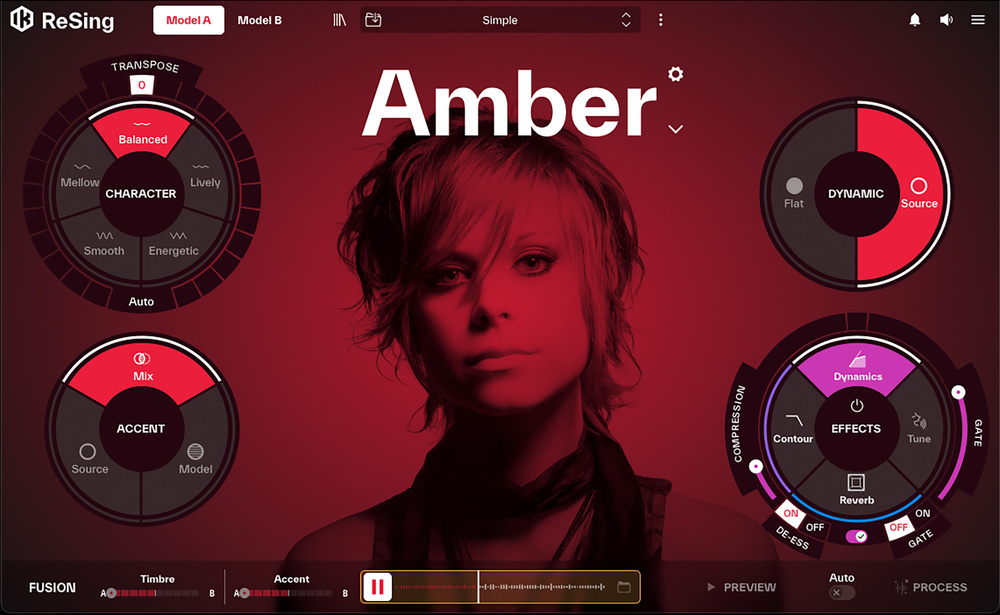
Give your vocals a completely new personality with IK’s ReSing.
Vocal synthesis, whether for sung vocals or spoken‑word dialogue, is undoubtedly a process that has made massive leaps forward in recent years, underpinned by advances in AI‑based processing. From the perspective of music/audio production, these products broadly fall into one of two categories: virtual singers (virtual instruments that can generate sung vocals) and voice changers (processors that transform a source voice/vocal into a different voice/vocal). The subject of this review — IK Multimedia’s ReSing — sits within this ‘voice changer’ category. So, if you have a single voice source for sung or spoken vocals, and want to change the character or gender of that voice, or even transform it into a musical instrument, just what can ReSing offer?
The Small Print
Having already implied that ReSing leans into AI, let’s head off the most obvious (and perfectly legitimate) elephant that might be in your room. IKM make it very clear within their description of ReSing that any training materials used within the product — in this case, the voices of specific singers or voiceover artists — have been used with suitable permission from (and compensation for) those individuals. Assuming you have the rights to use the original source recording you are transforming, any use of ReSing’s voice‑changing technology should not, therefore, get you into any ethical or legal hot water.
A second important initial observation is worth making. Sitting within the ‘voice changer’ category, ReSing can transform your sung vocals so that they sound like they were sung by somebody else. As a result, while it can change the character of the vocal delivery in some useful and interesting ways, any dubious pitching within the original source vocal is faithfully recreated in the transformed version. ReSing should not really be considered as a magic button to turn a bad singing performance into a great one.
ReSing should not really be considered as a magic button to turn a bad singing performance into a great one.
The Voice
ReSing is available as a single‑purchase perpetual product (no subscription required) and once installed, all processing is done locally. The standard version includes 10 different voice models, 10 instrument sounds and 10 ‘model generations’ while the Max version ups all three numbers to 25. Yes, voice‑to‑voice transformations aside, ReSing can transform your vocal source material into the sound of selected instruments. Equally, if you want to train your own voice models, ReSing supports that. There is an additional ‘unlimited model generation’ add‑on you can purchase if you need to train more voice models beyond the included 10 or 25.
Once installed, ReSing itself can run as a standalone application, a conventional VST, AU or AAX plug‑in or, DAW permitting, via ARA. The latter provides a more streamlined workflow, but both of the other options are perfectly workable; you just drag and drop the source audio into ReSing and processed versions are simply rendered to your drive system.
Personality...
You are reading one of the locked Subscribers-only articles from our latest 5 issues.
You've read 30% of this article for FREE, so to continue reading...
- ✅ Log in - if you have a Digital Subscription you bought from SoundOnSound.com
- ⬇️ Buy & Download this Single Article in PDF format £0.83 GBP$1.49 USD
For less than the price of a coffee, buy now and immediately download to your computer, tablet or mobile. - ⬇️ ⬇️ ⬇️ Buy & Download the FULL ISSUE PDF
Our 'full SOS magazine' for smartphone/tablet/computer. More info... - 📲 Buy a DIGITAL subscription (or 📖 📲 Print + Digital sub)
Instantly unlock ALL Premium web articles! We often release online-only content.
Visit our ShopStore.