

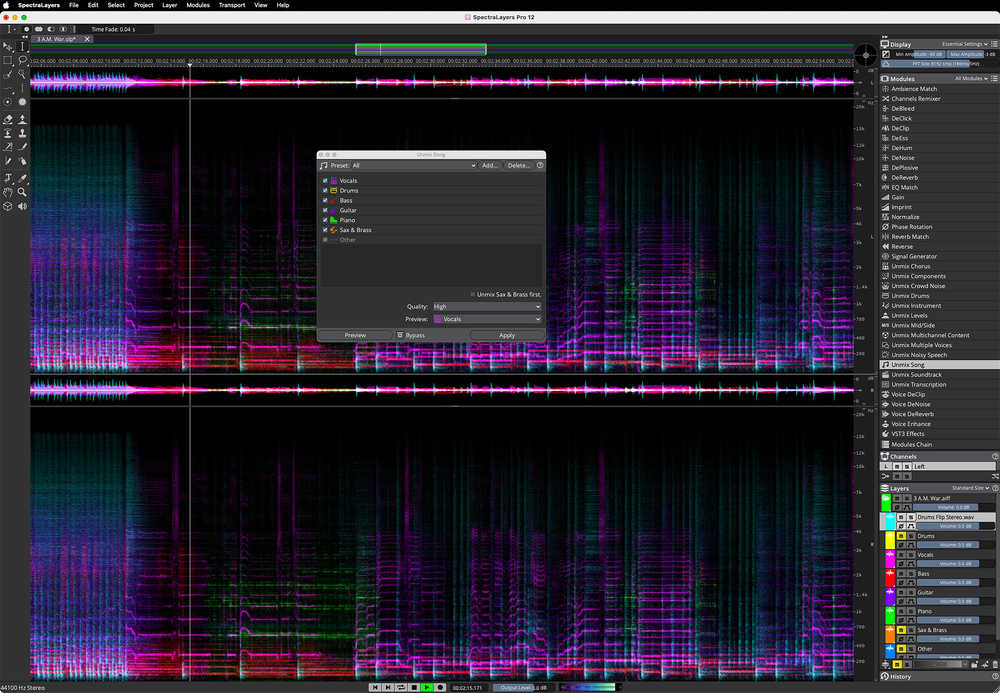
 SpectraLayers Pro 12 makes sophisticated spectral‑based complex audio editing tasks incredibly accessible to any level of user.
It’s only 12 months since the last version, but SpectraLayers Pro 12 has made some huge advances.
The world of spectral editing is on something of a roll, much of it driven by the integration of AI‑based algorithms into many of the typical processing and restoration tasks for which it is most often used. It’s perhaps not surprising, therefore, that this product category is seeing a pretty rapid upgrade cycle as manufactures try to keep up with — and ahead of — their competition. All of which perhaps explains why Steinberg have adopted an annual upgrade cycle for SpectraLayers Pro, and we now have version 12. So, just what’s new in the world of audio editing magic within SLP12?
How To Unbake A Cake
There is ‘new and improved’ scattered throughout the v12 update but, for many users, the highlights will be the further developments in SpectraLayer’s ability to do the audio equivalent of unbaking a cake. Four of the Unmix modules — Song, Drums, Noisy Speech and Transcription — plus the Voice DeNoise module get improvements in v12. For example, the Unmix Noisy Speech module, which separates an audio recording into ‘speech’ and ‘noise’ layers, generates noticeably cleaner results, making it easier to improve the intelligibility of a spoken voice in a post‑production setting, even when working with what might seem like potentially challenging source material.
From a music production perspective, it’s the Unmix Song and Unmix Drums modules that will attract the most attention. In testing both with a range of materials, the step up from v11 was very obvious. With Unmix Song, for example, the extracted vocal layer, which contains all the lead/backing/harmony vocals within the original mix, is obviously cleaner than with v11. Indeed, the quality of all the resulting layers is getting remarkably close to having a set of mix busses — drums, vocals, guitars, bass, piano, sax/brass and other — to work with, albeit with any effects associated with each instrument group already baked in. In use, the thing I found most remarkable was that, in the main, the majority of any remaining artefacts are focused on the effects elements of the original sounds (for example, sounds heavily processed by modulation effects); the fundamental sounds were generally dealt with very cleanly. This includes the drum and bass layers. Are they perfect? Well, no, but Steinberg have made significant steps forward here, particularly in terms of the cleanness of the drum transients (I’ll come back to transients later), while the bass appears much more solid. To my ears at least, SLP12 has now set a quality bar in terms of full song unmixing for others to match.
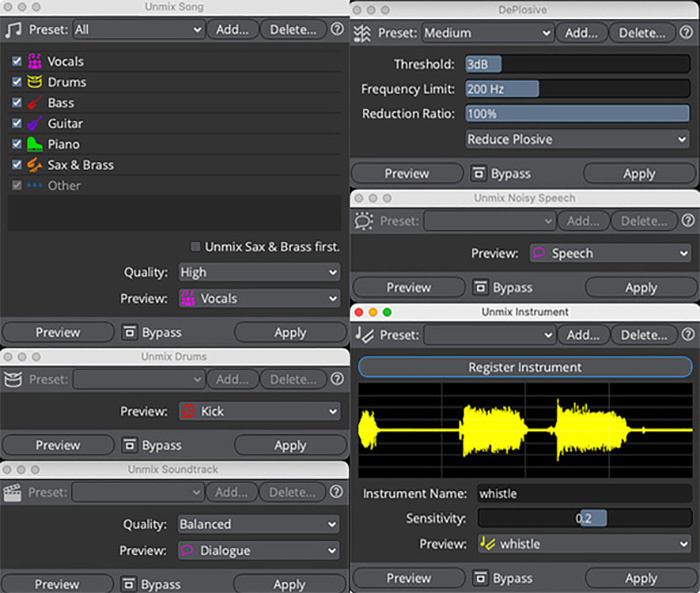 Many of SLP12’s existing modules have been improved, and new ones have also been added.
The Unmix Drums module brings both improved results and new layer options as you now get six layers in total: kick, snare, hi‑hat, toms, ride and crash. The kick/snare separation is generally very clean (and the snare layer does a respectable job with ghost notes) but perhaps the most notable improvement I found was with the hi‑hat, which, in most cases, seemed crisper than before. Depending upon your use case, and the nature of the drum submix you are dealing with (straight from the mixing desk or an unmixed drum layer), you may still find yourself with some manual editing to do. However, if all you need to do is make minor adjustments to the drum balance or use the resulting drum layers as triggers to replace or enforce the sounds with samples, it can facilitate either of these tasks.
New Modules
SLP12 adds four new modules: Unmix Instrument, Unmix Soundtrack, Voice Enhance and DePlosive. Unmix Instrument is an interesting new option in that it allows you to identify any single sound as an unmixing target. The only catch is that you have to ‘register’ the required sound first and this really requires a few seconds (up to 10) where the sound can be heard in isolation. In practice, this may not always be possible but the concept is interesting so I hope it is something that is developed over time.
In contrast, I think post‑production audio engineers will find the new Unmix Soundtrack module useful from day one. It generates three layers: dialogue, music and effects. As with all the Unmix modules, results will vary depending upon the original source material but with the few video clips I experimented with, I was impressed. Yes, in a busy action movie soundtrack, you might find some material gets directed into the wrong layer and requires a little manual editing, but obvious use cases include restoration of old film/video soundtracks, or providing alternate audio mixes with louder dialogue.
The DePlosive module is a useful addition. It does exactly what you would expect and does it very effectively. However, even more impressive is the new Voice Enhance module. Steinberg suggest that this can correct for clipping, compression artefacts, noise and excessive room ambience. While removing the unwanted elements of the sound is perhaps nothing new (although it is done very effectively here), what’s more remarkable is how well the module also restores the overall frequency balance of a voice. This ‘reconstruction’ element will undoubtedly be useful in audio restoration but, equally, might be useful for content creators looking just to sweeten their dialogue recordings if they know their recording environment is sub‑optimal.
Go With The Flow
It’s not all AI‑based news, though, as SLP12 also brings useful operational improvements for various editing tasks. An obvious highlight here is the slicker process for cutting material from one layer and pasting it into another layer of your choice. It makes a non‑destructive tidy up from a challenging unmixing process much faster.
This is enhanced further by various improvements to the selection processes. For example, it is now easier to change, edit and refine a selection prior to executing any editing process. In addition, the assisted processes for making selections based upon frequency, harmonics or transients have all been improved. The latter is particularly useful when working with drum‑based layers. For example, you might select the transients only of a snare or kick layer, move these to a separate layer, then adjust the relative levels of the transient and sustained portions of the sound to change the dynamics or punchiness of the drum.
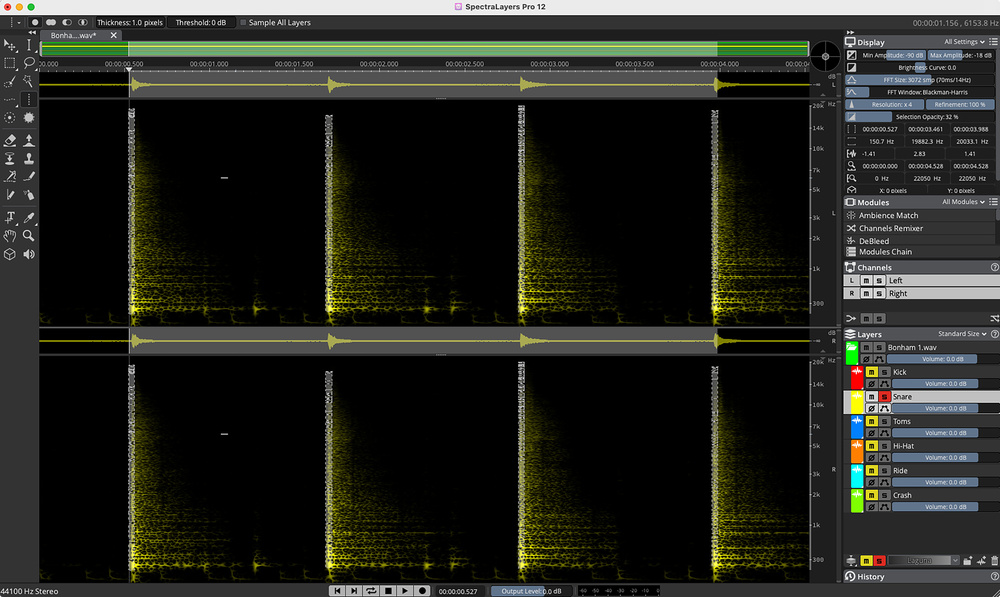 SLP12 also makes manual editing workflows easier through refinements to features such as the frequency, harmonics and (as shown here) transient selection tools.
Not so many years ago, these sorts of spectral editing tasks used to be incredibly challenging and, while Steinberg have made amazing strides with all SLP’s AI‑based processing tools since they acquired the software in 2019, it’s also true that they have made rapid improvements to the manual editing experience. This is no longer an ‘experts only’ editing environment and it’s great to see these sorts of accessibility barriers continue to diminish.
And There’s More
There is a whole swathe of other improvements contained within SLP12. These include refinements within the ARA support, an improved History panel, native support of Windows ARM64 hardware and the display of a time estimate for completion when you trigger a module (so you can plan a suitable hot beverage).
There are a couple of obvious highlights here also. First, a new Phase Rotation module allows you to easily correct asymmetrical waveforms which can, in turn, make it easier to handle their compression or overall volume. Second, the Batch Processing options have been refined, allowing you more control over the folder organisation and filenames of any audio outputs generated by your sequenced processing. For those requiring to run processes on multiple files (for example, in post‑production when passing multiple dialogue files through the same noise reduction or enhancement processes), this makes it much easier to ‘set and forget’ some repetitive tasks knowing that processed output files will get suitably organised while you go off and do something else (like get a good night’s sleep!).
Conclusions
I know, it seems like the proverbial five minutes since SOS last reviewed SpectraLayers Pro (actually, it was the October 2024 issue). I can therefore understand if some occasional users are frustrated by the rapid paid upgrade cycle and choose to move up at a slower own pace.
However, if SLP is part of your daily workflow in a professional audio editing environment, the improvements that SPL12 brings will be very welcome, particularly if your primary use for the software utilises its various AI‑based modules. In a commercial environment, if those improvements mean even one significant job gets through the quality bar when it might not have done with SLP11, then the upgrade will probably have paid for itself. And, with workflow refinements elsewhere, things will also get done faster and more efficiently.
As a suite of tools for unmixing, audio restoration and audio enhancement work, I think Steinberg have set the standard for others to match.
Personally, I can’t wait to see just how much further Steinberg can push all these boundaries. Same time next year for SLP13? Quite possibly... watch this space. Until then, as a suite of tools for unmixing, audio restoration and audio enhancement work, I think Steinberg have set the standard for others to match. SpectraLayers Pro 12 is both technically impressive and — for a spectral editing platform — remarkably straightforward to use. It’s a compelling combination.
Pros
- Very noticeable improvements within the AI‑based processing modules.
Cons
- Rapid upgrade cycle may frustrate more occasional users.
Summary
Steinberg continue to make rapid progress with SpectraLayers Pro, with this v12 release bringing very obvious technical and operational improvements.
Information
£290 including VAT. Upgrade pricing available.
$349.99. Upgrade pricing available.