

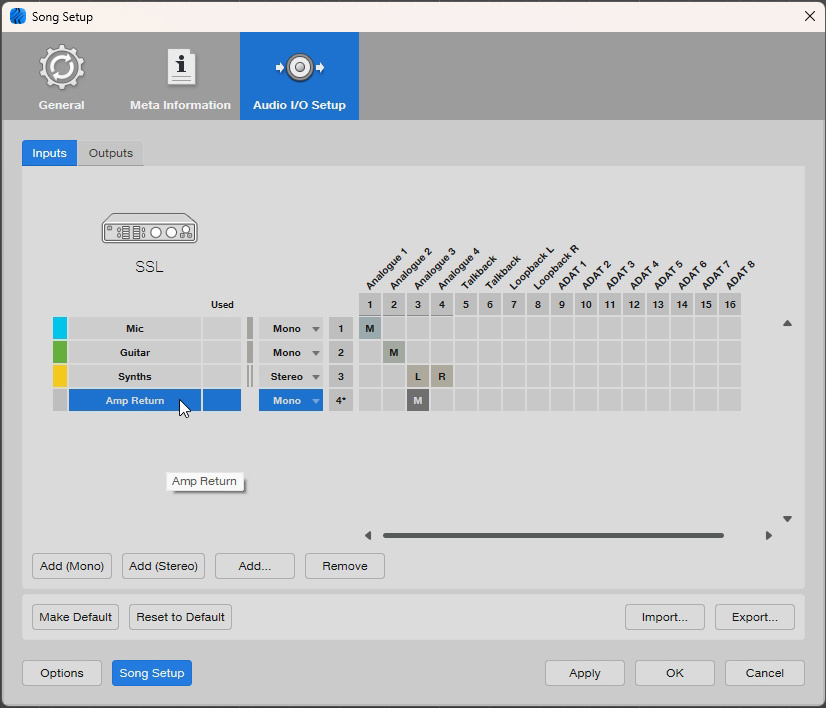
 The Inputs tab of the Audio I/O Setup window. Here’s where you assign a physical input on your audio interface for capturing your re‑amped guitar sound.
We talk you through the ins and outs of re‑amping guitars in Studio One.
There are times when your best course of action is to record the guitar first and worry about the tone later. With the right equipment and some useful Studio One know‑how, you can try all sorts of different ways of amplifying your guitar before you commit it to the mix. This is known as re‑amping.
Re‑amping gives you a considerable amount of versatility and the opportunity to try different effects, tones, setups and configurations that perhaps weren’t available at the time of recording.
The basic idea is that you record your guitar completely dry by direct injection, and then route that track out of the DAW and into a guitar amp, which you mic up and record. Re‑amping gives you a considerable amount of versatility and the opportunity to try different effects, tones, setups and configurations that perhaps weren’t available at the time of recording. Studio One Professional includes a rather neat plug‑in solution for accomplishing this, called Pipeline XT. We’re also going to look at how to do it manually for those of you who are running the Artist version of Studio One, and don’t have that plug‑in in your box of tricks.
Before we turn to the computer, we need to make sure we have the right hardware in place to make re‑amping possible, or at least not rubbish.
High & Dry
To record dry guitar, you will need an audio interface with a high‑impedance mono unbalanced input. Most audio interfaces have this and it’s usually marked as ‘Hi‑Z’ or ‘instrument’. Impedance is a complex and meandering concept that revolves around the total resistance and reactance of a circuit. Hugh Robjohns wrote an excellent article all about it in SOS January 2003 (www.soundonsound.com/techniques/understanding-impedance). All we really need to know is that electric guitars have a high‑impedance output and would very much like a high‑impedance input to plug into, or they tend to lose their high end and sustain. If your audio interface doesn’t have a Hi‑Z input, you’ll need a DI (Direct Injection) box, which converts the guitar signal into a balanced, low‑impedance signal that can plug into a standard microphone input.
To do the re‑amping, your audio interface will need a spare output, and another input for capturing the sound of your amp. This loop has certain requirements to make it work properly. First of all, the dry guitar signal you are sending out is emerging from a balanced line output on your audio interface. Your amp is expecting the mono, unbalanced, high‑impedance output of a guitar, and so we need to convert the signal into something resembling that....
You are reading one of the locked Subscribers-only articles from our latest 5 issues.
You've read 30% of this article for FREE, so to continue reading...
- ✅ Log in - if you have a Digital Subscription you bought from SoundOnSound.com
- ⬇️ Buy & Download this Single Article in PDF format £0.83 GBP$1.49 USD
For less than the price of a coffee, buy now and immediately download to your computer, tablet or mobile. - ⬇️ ⬇️ ⬇️ Buy & Download the FULL ISSUE PDF
Our 'full SOS magazine' for smartphone/tablet/computer. More info... - 📲 Buy a DIGITAL subscription (or 📖 📲 Print + Digital sub)
Instantly unlock ALL Premium web articles! We often release online-only content.
Visit our ShopStore.