

The pioneers of pristine sound have released a plug‑in de‑noiser priced within reach of mere mortals — and with near‑zero latency, you can even use it live on air!
CEDAR are a pioneering digital audio technology company based just outside Cambridge, UK whose origins lie in a 1980s research collaboration between Cambridge University and the British Library National Sound Archive. They were the first commercial company to give the world spectral editing on a computer, and they invented digital dialogue noise suppression. Recent years have seen a flurry of new spectral editing and machine‑learning‑based noise‑suppression and dialogue isolation tools from a range of developers, but arguably all of them stand on the shoulders of CEDAR — who haven’t been resting on their laurels.
They’ve continued to develop their de‑noise, restoration and dialogue‑isolation tools, which remain among the most effective available. Their range does include machine‑learning tools such as VoiceEx, but they also use methods that allow operation at far lower latency than is possible with ‘AI’. CEDAR also have a strong focus on tools that are quick and easy to use, and that’s highly valued by professional users; CEDAR’s tech has seen use on thousands of TV series and Hollywood movies.
The down side? Well, CEDAR have hitherto priced their tools with those professional markets in mind. But, recognising a growing demand for their tools in different markets (eg. theatre, live sound, live corporate events and houses of worship, not to mention podcasting, content‑creation and streaming), CEDAR recently released two plug‑ins, ScreenVox and StageVox, and have priced them more accessibly. The former is under review here.
Basics
ScreenVox is an insert plug‑in for DAW and NLE hosts running on Mac (macOS 10.3 onwards) or Windows (10 64‑bit and newer), and it supports the AU, VST3 and AAX Native plug‑in formats. It’s authorised by iLok (Cloud‑based or USB dongle). The installer for my M1 Mac review system was a reasonably modest 237.1MB download, and there’s a 14‑day free demo if you’d like to try before you buy.
ScreenVox does not use machine learning, but rather an adaptive algorithmic approach, and this decision has enabled CEDAR to deliver what is the lowest‑latency de‑noiser I’ve encountered. Hold on to that thought because it’s hugely significant, but first let’s consider ScreenVox’s functionality and efficacy.
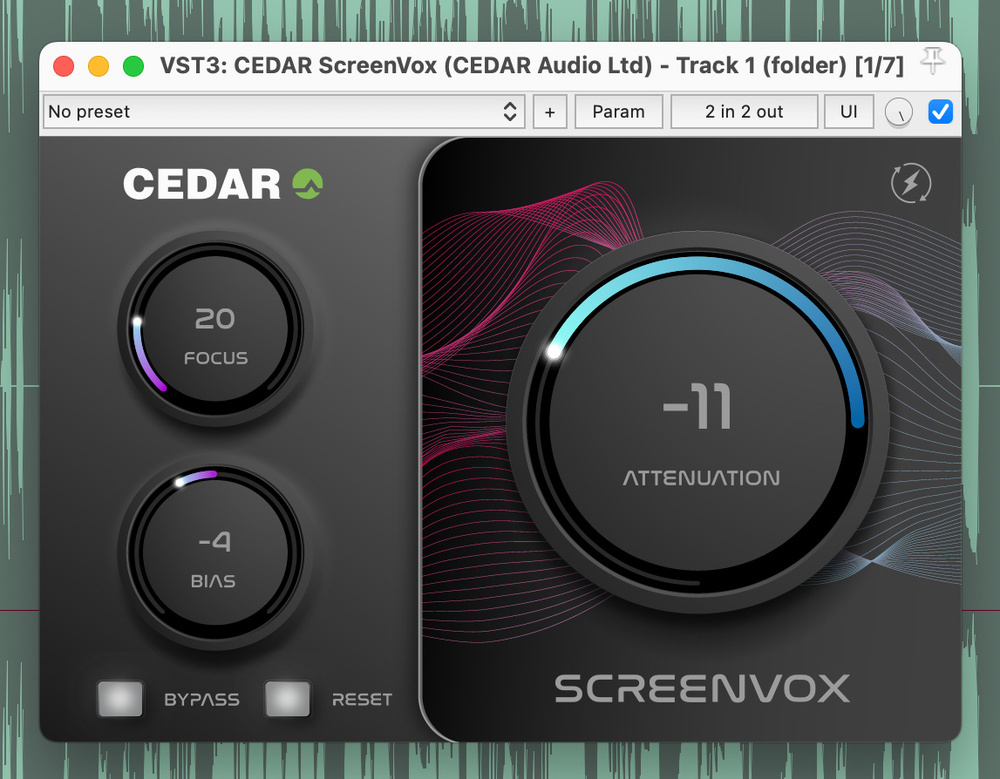
Once installed, you can insert ScreenVox on a track (or clip, if your DAW supports that), just as you would any insert plug‑in. In keeping with CEDAR’s design philosophy, the GUI is sleek and simple, with just three main adjustable parameters, plus bypass and reset buttons. Accordingly, basic operation is simple too, and tallies with the advice given on CEDAR’s website: first dial in a bit of attenuation, so you can hear the results of turning the other controls. Then adjust the Focus knob, to determine how ScreenVox responds to “noise elements of greater or lesser prominence”, then the BIAS control, to “fine‑tune the noise‑reduction process”. And finally, “dial Attenuation to clean it all up!”
Let’s expand on those descriptions a little. The Attenuation control’s purpose should be obvious, but Focus effectively decides which noise components are targeted for removal. At higher settings the plug‑in will concentrate on the louder noise components — for example, if there’s significant buzz, hum or ringing, it could remove more of this and less by way of lower‑level hiss. The BIAS knob, on the other hand, biases the algorithm towards being more or less tolerant of the noise. At higher settings you’ll remove more of the noise, but while it doesn’t necessarily leave you with ‘less voice’, you’ll tend to lose more by way of ambience, which can lead the voice to sound less natural.
The Bypass button lets you compare the character of the processed voice with that of the original source, and in my tests it worked smoothly, without the click that my DAW’s built‑in plug‑in bypass facility introduced. If you press Reset, the button lights pink while ScreenVox quickly re‑analyses the signal and adapts its processing accordingly, at which point it returns to unlit status. Generally this worked swiftly and smoothly. On a few occasions the button remained lit (hopefully something that can be ironed out) but a second click always sorted that out.
Screen Test
With relatively ‘static’ sounds, such as the broadband traffic or aeroplane noise you often encounter on location, the noise emanating from computer or amplifier fans, or louder devices such as air‑con units, ScreenVox worked very well indeed. It could remove almost all such noise while also delivering a more natural‑sounding voice than most noise removers do. It tended to retain more of the characteristic weight in male voices than, say, Accentize dxRevive, which I use a lot for post‑production. Another positive is that as ScreenVox’s noise reduction performs well during pauses between dialogue, so the result is consistent: the noise never ‘whooshes’ up in the way I’ve heard it do with some other tools.
All good so far, then. In fact, on such noises very good indeed. But while ScreenVox is clearly very clever, it isn’t powered by magic. In more extreme test scenarios — poorer‑quality recordings, with higher noise levels relative to the voice, particularly where the noise is very dynamic in nature, or features other human voices — I heard more by way of side‑effects. For example, the background chatter of voices and loud clinks of cutlery and crockery in a café recording were tricky to tame without affecting the character of the main voice. But I stress that I was deliberately using sloppy recordings to discover for readers the limits of this plug‑in’s capability. These aren’t really the problems ScreenVox was conceived to solve, and I’ve yet to encounter any de‑noiser that can deliver natural‑sounding results in such situations, never mind a low‑latency one. More professional recordings, with appropriate choice and positioning of mics, improved the dialogue‑to‑background sound ratio and helped ScreenVox to deliver far better results. Even for the ‘bad’ recordings, though, where natural results weren’t achievable, ScreenVox could improve the clarity of dialogue significantly, to the extent that for some applications it could prove the difference between intelligible or not.
Latency? What Latency?
In terms of subjective result, on the right material ScreenVox is up there with the best. But as I alluded to above, there’s another hugely important consideration: it’s an insert plug‑in, and one that operates with astonishingly low latency.
I’ve noted in previous reviews some reasons why insert plug‑ins might be preferable in post‑production applications to offline noise‑removal tools. Not only can you process signals at any point in the signal chain, but you don’t need to commit to the result until the end of the project: you can revise the settings at any time during your project, for example if compression later alerts you to artefacts you initially missed.
CEDAR make the bold claim that ScreenVox operates at near‑zero latency, and it’s no idle marketing boast.
But all the other effective noise‑removal insert plug‑ins I’ve tried introduce too much latency for live use, particularly where live video screening is involved, whether in broadcast, streaming, or live speaking events. CEDAR make the bold claim that ScreenVox operates at “near‑zero latency”, and it’s no idle marketing boast. In my Reaper test projects, ScreenVox introduced 14 samples of latency, which, at 48kHz, translates to a delay of just under 0.3ms, and at 96kHz to a mere 0.15ms. For reference, in the same project Acon Digital’s DeNoise 2 introduced a 1536 sample delay (circa 16ms at 96kHz) while for dxRevive it was 4641 samples (over 48ms at 96kHz). As a technical achievement that’s impressive, but there are very practical benefits too: such latencies are imperceptible, so it can be used in all those live‑audio contexts where other tools just aren’t suitable. To put it simply: ScreenVox won’t cause lip‑sync problems. (I should note a caveat: other elements in your digital audio system can contribute to the overall system latency!)
Despite this wondrously speedy processing, ScreenVox also seems to be very CPU efficient. I was able to run many instances (I lost track before I gave up counting) on my 2021 M1 MacBook Pro, even at 96kHz and with a small sample buffer, suggesting that even older machines should be able to run multiple instances.
Verdict
In years past, CEDAR’s tools have, frankly, been too expensive for me personally to justify. ScreenVox isn’t exactly ‘inexpensive’ compared with some de‑noisers, but the asking price puts it within reach of those who work on dialogue‑centric production at all levels; in the grand scheme of things, it costs no more than a mid‑priced mic, or affordable LED lighting. Importantly, so long as you start with appropriate miking for the situation, it’s up there with the best when it comes to de‑noising results. But the gobsmackingly low latency distinguishes it from all otherwise comparable software. It’s well worth checking out the fully functional demo.
Summary
A decent dialogue de‑noiser with seriously low latency that means it can be used to clean live‑streamed and live‑screened dialogue, without noticeable delay or lip sync problems.