

Want your mixes and masters to have power and impact on streaming services? Then you might want to pay more attention to density and dynamics...
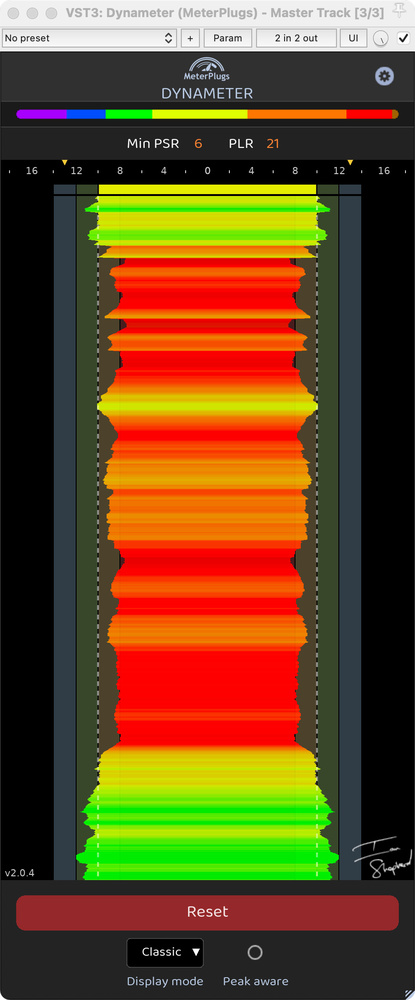 Classic mode: a good, quick guide to the density and dynamics of your track, along with preset guide lanes for popular streaming services.While they might not do anything to your audio, metering plug‑ins can certainly help you improve it. They may simply give us confidence that what our ears are telling us is correct, but they can also signpost potential problems and prompt us to investigate. Such tools are the stock in trade of Ian Kerr, whose Meterplugs company have forged a productive partnership with mastering engineer Ian Shepherd, and in recent years the pair have developed a number of interesting, innovative software tools.
Meterplugs’ latest release is billed as a major update to Dynameter, the original version of which was reviewed by Hugh Robjohns in SOS August 2017. Dynameter 2 is available for VST2.4, VST3, AU and AAX plug‑in hosts on Mac and Windows, and authorisation is by serial number; I tested it predominantly using the VST3 version in Cockos Reaper.
Dynameter Primer
For many, Ian Shepherd’s name will be inextricably linked with the ‘loudness wars’ debate. As he made clear in our interview a few years ago, though (SOS April 2023: https://sosm.ag/ian-shepherd-loudness-dynamics), his position is not ‘anti‑loud’ per se. Rather, he believes that LUFS loudness is for use in playback systems, and that it’s not particularly useful for engineers to adopt LUFS targets, whatever the figure. I agree. For one thing, if it’s going to be turned up or down anyway, what does the LUFS matter? For another, where loudness normalisation isn’t used, people naturally tend to set the playback volume accordingly. Instead, Ian advocates that any engineers wanting to work to reference figures, to ensure their mixes and masters have punch and impact, should focus instead on ‘dynamics’ or ‘density’ (flip sides of the same coin).
 To that end, the main focus of Dynameter’s display is the PSR, or Peak to Short‑term loudness Ratio. A refinement of the ‘crest factor’ (the difference between the peak of a signal and its RMS average), PSR substitutes RMS with the ITU‑R BS.1770‑3 short‑term loudness (LUFS‑S) measurement. In both cases, the higher the number the greater the signal dynamics, and the lower it is the denser the material.
Other things being equal (ie. any gain doesn’t result in processing changes), the figure should remain consistent no matter how much gain or attenuation is applied, for example when dialling in headroom when mastering. Ian’s suggestion is that the loudest sections of tracks in any genre, after all mastering processing has been applied, should have a minimum PSR of around 8. You could choose a different number, though, and Dynameter would still help you to mix and master consistently; it has always had presets to assist in that. But certainly ‘potting the 8’ always seems to guide me toward good, impactful results....
You are reading one of the locked Subscribers-only articles from our latest 5 issues.
You've read 30% of this article for FREE, so to continue reading...
- ✅ Log in - if you have a Digital Subscription you bought from SoundOnSound.com
- ⬇️ Buy & Download this Single Article in PDF format £0.83 GBP$1.49 USD
For less than the price of a coffee, buy now and immediately download to your computer, tablet or mobile. - ⬇️ ⬇️ ⬇️ Buy & Download the FULL ISSUE PDF
Our 'full SOS magazine' for smartphone/tablet/computer. More info... - 📲 Buy a DIGITAL subscription (or 📖 📲 Print + Digital sub)
Instantly unlock ALL Premium web articles! We often release online-only content.
Visit our ShopStore.