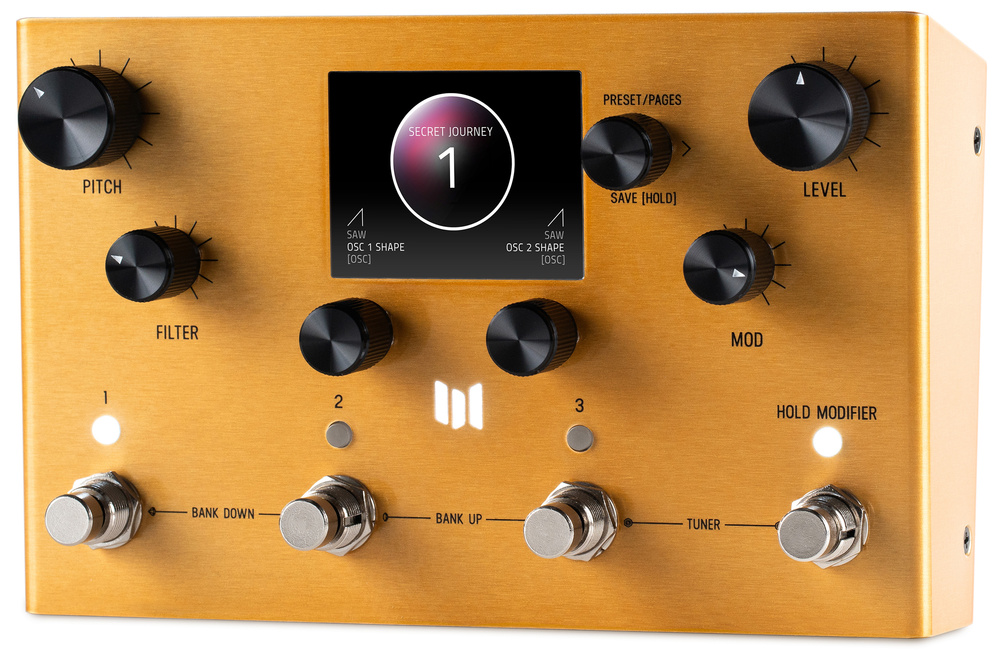
With four different modes, onboard effects and MIDI sync capability, there’s plenty of creative potential packed into this stompbox.
The Meris Enzo X might best be described as being a pedal that creates synth‑like sounds from a guitar. It uses a hybrid approach that allows it to create mono or polyphonic sounds, based around five distinct operating modes that I’ll go into more depth on below. Naturally, it’s an evolution of the smaller, original Enzo pedal that I reviewed back in SOS January 2019, but although a tad larger it’s still simple to use — despite the new Enzo X boasting some hugely impresssive capabilities, it can be controlled using just seven knobs and four footswitches.
Sitting in a metal enclosure, the Enzo X has around the same footprint as a typical paperback book, and incorporates a colour LCD screen, five‑pin MIDI I/O, an assignable expression pedal jack, and a USB‑C port for firmware updates. The signal path can handle any permutation of mono and stereo in and out, and both the in and the out are switchable for synth/line or instrument level. The analogue signal is converted to/from digital at 24‑bit/48kHz, while the processing is performed at 32‑bit floating‑point using Sharc DSP. An Analog Devices JFET input stage provides a suitably high impedance and low‑noise preamplification. The user also has the choice of a true or buffered bypass, and there are 99 user presets arranged in 33 banks plus a quick‑access bank for three favourite patches.
Synth Modes & Effects
What the Enzo X can do is probably best explained by running you through the four different operational modes. Monophonic synth pedals are nothing new, of course, and as with others the Mono Synth mode here requires the user to avoid playing more than one note at the same time. That said, the processing seems to tolerate fingering noise and quietly resonating adjacent strings better than most, which is a definite plus point. With its synth‑style filters, separate ADSR envelopes for both filters and amplitude, selectable saw/triangle/square waveforms, modulation and FM cross‑modulation between two oscillators, the Mono mode works really well for lead and bass synth sounds. There’s also the ability to add noise to the synth sounds, and this Mono Synth section can also create portamento pitch glides.
Poly Synth mode offers similar waveform choices but supports six‑voice polyphony, each voice having two independent oscillators with ADSR amplitude and filter envelopes. The filter selection can be set to Ladder, State‑Variable or Twin modes, and there’s cross‑modulation between the oscillators to give sounds more depth and interest: in this mode, the Enzo X is able to produce evolving pad sounds, polyphonic stabs and huge clouds of reverb‑drenched loveliness. There’s also the facility to have the synth voices persist after the end of the note that’s coming from a guitar, and this creates a more keyboard‑like feel when you’re changing notes or chords.
Another mode, called Arp Synth, uses the same engine as the Poly Synth mode but it adds note sequencing, controlling both oscillators. You can choose one of four different arpeggio patterns of up to 16 steps, over one, two or three octaves. The arpeggios can be sync’ed to MIDI Clock too, of course, so that you can keep them in time with other devices or your DAW.
A third mode, Dry Mono, doesn’t actually use the synth engines, but rather processes the guitar or bass signal with a monophonic pitch‑shifter that has a range of up to ±2 octaves. Again, the user needs to avoid playing more than one note at the same time for this to work cleanly but, if you can manage that, the result can sound absolutely huge. Finally, in a similar vein, there’s Dry Poly mode. This again bypasses the synth engines but this time pitch‑shifts chords, using poly processing based on that in Meris’s LVX platform but tailored specifically for the Enzo X.
The onboard effects section plays a large part in creating the Enzo X’s synth sounds, but it can also be used with the two Dry modes. In addition to the filters, separate white noise generation, and other synth‑related treatments, the effects engine offers three stereo Prism reverb types from their Mercury (a dedicated reverb pedal), plus a pair of delays of up to 2.5s, again sync’able to MIDI Clock. Delay tails can be carried over when switching presets when carry‑over mode is active. Modulation effects include the usual chorus, phaser, flanger and vibrato, with variations on each, plus a ring modulator. A Drive section offers a choice of bit‑crushing, op‑amp, tube or transistor distortion.
It’s even possible to play the Enzo X’s synth sections from a MIDI keyboard!
Series or parallel routing options can be explored, and an expression pedal can be assigned to various functions such as filter cutoff or modulation. MIDI can be used for switching presets but can also be used for parameter control (the Enzo X supports full MIDI CC mapping) and tempo sync. Preset dumping and loading is also supported, and it’s even possible to play the Enzo X’s synth sections (but obviously not the Dry mode sounds) from a MIDI keyboard!
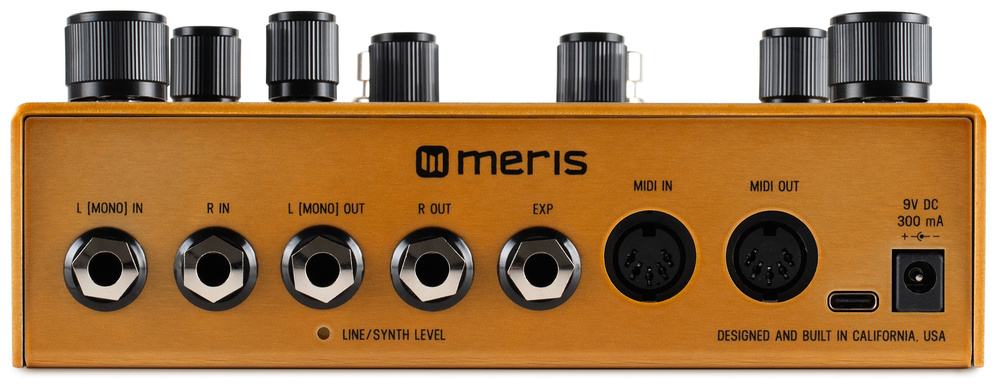 The Enzo X supports mono or stereo inputs and outputs, while the MIDI DINs facilitate tempo sync and even remote triggering of the synths.
Set The Controls
The Enzo X’s controls are arranged with dedicated knobs for Pitch (in semitones), Filter, Level and Mod (LFO, envelope and so on), with a further multi‑function push/turn encoder knob for patch selection, page select when editing, and patch saving. Below the display are two encoders that in general control what is shown above them on the screen. Pressing the Save/Page encoder changes the display to edit mode, in which the left‑hand encoder can be used to select from the on‑screen options (neatly displayed within circles) and the right‑hand encoder used to adjust the selected parameter. The Save/Page knob can be turned to move through the sections that you might wish to adjust: Oscillator, Filter, Mod, Amp, Ambience, Drive, Delay and so on. Level determines the synth engine’s output volume pre the Drive or Delay effects. Two favourite assigned parameters can be assigned to the two knobs below the display for quick adjustment during live performance. Buttons with integral LEDs are located above the four footswitches; these are preset selectors and essentially mirror the footswitches for desktop use.
Presets can be called up either by using the footswitches to navigate banks (and the three presets in each one) or by turning the Preset/Pages knob. Turning the Pitch, Filter, Mod or Level knobs changes the display to show the values while adjustments are being made, then it reverts back to its previous state. Patches can be saved and renamed. For deeper editing, pressing then turning the Preset/Pages knob moves through the parameter groups (for example, Oscillators, Modulators and Clocking), with the knobs directly below the display being used to select and adjust the on‑screen options.
Navigation using the Enzo X hardware controls is actually pretty intuitive, but there’s also a free PC/Mac software editor, and it’s worth downloading, as it makes life easier still. Note, though, that this can only be connected via a five‑pin MIDI interface; the USB‑C port on the back panel doesn’t support MIDI, as it does in many pedals, but is used purely to perform firmware updates. The editor is built around a series of non‑threatening pages, covering Osc, Filter, Filter Envelope, Amp Envelopes, Drive, Clock, Ambience, Modulate, Mix, Modifiers and Exp Pedal. The last of those offers a wide choice of assignment options, including parameters relating to the Oscillators, Filters, Amp Envelope, Tempo, Ambience and Modulation sections. Patches may also be reorganised, renamed and backed up here.
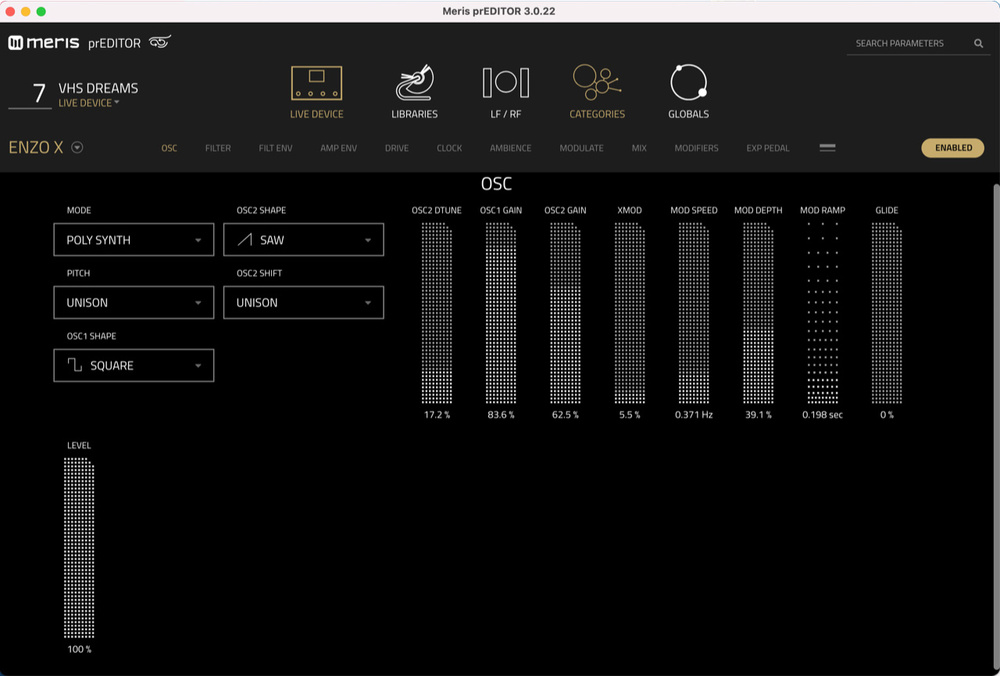 While navigation and editing using the hardware controls is surprisingly intuitive, there’s also a free Mac/Windows app that connects over MIDI.
The Sounds
Exploring the presets is a great way to understand what the Enzo X is capable of. These show off a wide range of sounds, from fat synth leads and basses to more ambient creations. As is so often the case with presets, I felt that the preset designers went a bit overboard with the amount of added reverb, and also in allowing notes to persist for too long, but they do a good demonstration job, and it’s super easy to make adjustments to adapt them to taste, before saving the updated version over the original.
The Mono Synth sounds have the strongest focus, and with reasonably clean playing they track well, even if careless fingering of your guitar can still result in the odd glitchy octave swoop. There are some really solid bass sounds to be found here, as well as leads that can go from searing to mellow. While the raw oscillator options themselves are relatively simple, the extensive modulation and effects routing allow you to create far more complex sounds. And if you also add in the original guitar sound and apply effects, the results really can be impressive.
The Poly Synth sounds might be somewhat more diffuse‑sounding, but they can sound lovely — especially if you layer in a little of the dry sound, to add a hint more note definition. The filter and volume ADSRs make it possible to create some very plausible polyphonic pads, and there’s lots of fun to be had in the arpeggio section too. But the so‑called Dry options shouldn’t be ignored. Dry Mono adds the option of pitch‑shifting for single‑note work while also giving you access to the effects, and Dry Poly mode employs polyphonic pitch‑shifting which, along with the effects, can be use to create a different, possibly more organic‑sounding feel when compared with the Poly Synth options.
Verdict
The Enzo X offers a lot of creative potential for guitarists who are searching for a more synth‑like character, but doesn’t burden you with the complexities of a full‑blown guitar synth. There are some conceptual similarities with the Boss SY‑200/300 (also guitar‑synth pedals that work with a standard guitar pickup), but there are differences too, and each definitely has its own character. There’s much to explore for the ambient music‑maker or soundscape designer too, and it’s great that the synth engines can be played directly via MIDI. In short, this is a pedal with huge creative potential for any guitarist or bass player. Indeed, the fact that my only ‘gripe’ is that I’d have liked MIDI to be available over the USB connection, not just the five‑pin DINs, speaks volumes!
Summary
An excellent, versatile and intuitive guitar‑synth pedal that’s brimming over with creative potential.
When you purchase via links on our site, SOS may earn an affiliate commission. More info...