

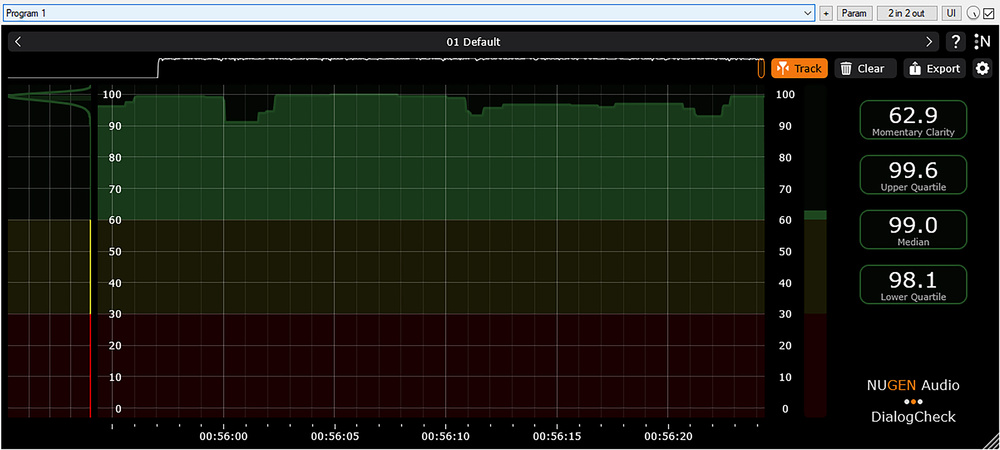
 A screenshot of the DialogCheck GUI after playing through a podcast interview of clean and perfectly intelligible dialogue. Note the very high median clarity value, and the narrow range between the upper and lower quartiles. The consistency of clarity is also shown in the statistical distribution graph on the left‑hand side.
The problem of dialogue intelligibility has proven a stubborn nut to crack — but this new meter promises to make consistently clear voices easier to achieve...
The intelligibility and/or clarity of speech is quite obviously of paramount importance in almost all audio‑programme content, whether that’s film, TV, radio, podcasts, YouTube and TikTok videos, computer games... or whatever. Unfortunately, poor‑quality dialogue remains a primary cause for complaint amongst broadcasting and streaming viewers and listeners — after all, it’s impossible to enjoy a programme (or to convey useful information to a listener) if the speech is hard to follow.
Since we all know, intuitively, whether dialogue is intelligible or not — we can either understand the words easily, or we can’t — it might seem like it should be easy for programme makers to judge. Yet, speech intelligibility can actually be quite hard for them to assess, and this is the problem Nugen aim to address with their DialogCheck plug‑in. But before I start exploring the plug‑in itself I’d like to discuss the complex nature of the problem in a little more detail.
Quantifying The Problem
A key reason for the difficulty in judging intelligibility is that key production staff will typically spend weeks or months working with the script before filming or recording — so, even if a performer mumbles their lines, they already know what they are supposed to be saying. Sound recordists typically follow a script too, so, again, poor diction can easily go unnoticed because the brain, primed by the script, automatically ‘fills in the gaps’.
When it comes to post‑production, either poor delivery during the recorded scene or a mix with heavy effects or music may well seem perfectly intelligible to the post‑production crew, too — not only because of their prior knowledge and familiarity with the content, but also because they’re auditioning it using high‑quality monitoring equipment in acoustically treated listening environments, and enjoy the spatial separation afforded by multi‑channel speaker systems. Casual viewers/listeners, on the other hand, are new to the production, so they don’t have that prior knowledge of the script, and they’re also unlikely to be listening to high‑quality loudspeakers in a good acoustic environment. Worse still, they probably have to contend with all manner of background domestic noises that can mask the dialogue or distract their attention.
Although some of these impediments to speech intelligibility are far beyond the control of the programme creators, many elements within the production process can be controlled. And the first step in optimising speech clarity is being able to quantify it — accurately, reliably and repeatedly — both in its raw state when being captured, and in the context of a full production mix.
So, the fundamental question to answer is: how can we quantify speech intelligibility? And that’s a conundrum that’s been exercising the minds of clever people for some time. Some of the answers have come from Fraunhofer IDMT, who have developed a solution called the ‘Listening Effort Meter’. It’s a technology that combines automatic speech recognition with psychoacoustic modelling, and is powered by twin AI neural networks. During its development, the LE‑Meter’s results were validated through extensive listening tests, comparing the algorithm’s figures with subjective human assessments of speech intelligibility and clarity.
Enter Nugen
Nugen Audio, working with Fraunhofer IDMT and with input from Netflix, have combined this LE‑Meter technology with their own expertise in history‑view metering formats (as seen in their VisLM loudness meter, for example), to create a plug‑in called DialogCheck. It’s available in 64‑bit VST3, AAX and AU plug‑in formats, secured using PACE iLok, and compatible with computer platforms later than Windows 7 and macOS 11. All standard channel formats from mono up to 7.1.4 are supported, and the plug‑in automatically detects speech within a complete mix, ignoring silences or music‑only sequences, for example, so that they don’t negatively impact the numerical Clarity indices.
I should stress that this is an intelligibility analyser or metering system, not a signal processor, or ‘improver’ — it doesn’t change the mix in any way. Rather, it highlights sections in time where its analysis suggests that speech intelligibility might be impaired, and provides reliable numbers to quantify the perceived speech clarity. Nugen’s history view concept is critical to the plug‑in’s operation and usefulness.
It allows sections of poor intelligibility to be easily identified, thus making reworking of low‑clarity sections fast and easy.
Being timecode‑locked to the DAW, it allows sections of poor intelligibility to be easily identified, thus making reworking of low‑clarity sections fast and easy. For example, once a region of poor clarity is identified, the post‑production department could improve noise reduction processing of the raw sync source files, or maybe decide to replace the original location sync sound with ADR. And during the mix stages, the mix might be rebalanced to leave more ‘space’ around the dialogue, with lowered effects or music.
Although most users will probably run the programme audio through the plug‑in in real‑time, during a mix or perhaps a QC assessment, the plug‑in can also be used faster‑than‑real‑time using an offline render, for rapid assessment of programme conformation to the streamers’ or broadcasters’ policies.
DialogCheck Display
In many ways, the DialogCheck display resembles typical loudness history metering systems, which, if you have experience of Nugen’s other products, isn’t surprising. The centre of the GUI, which can be scaled as required, is dominated by the History View, a scrolling timeline whose window duration can also be resized. It shows the calculated dialogue Clarity as a vertical bar‑graph, scaled from 0 at the bottom to 100 at the top, and the default settings colour anything above 60 green (indicating acceptable intelligibility). The 30‑60 region is yellow, while 0‑30 is red, to highlight dialogue with reduced or poor intelligibility. These default colours and thresholds can be adjusted, if required, and the new parameters can be stored with other user‑configured settings as presets, alongside a number of factory settings including Netflix, High Alert, High Contrast, and half a dozen other options.
A Macro View thumbnail of the entire monitoring duration is shown above the main scrolling chart as an aid to locating problematic sections, while to the right is a real‑time bar‑graph meter displaying the current momentary clarity value. It’s this information that’s then encapsulated into the History View.
Arrayed at the right‑hand side of the display are four numerical boxes that provide quantifiable figures for the assessed dialogue clarity. The top box gives the ‘now’ momentary figure, and this is supplemented by the overall median value (assessed over the full duration of the programme, much like the Integrated Loudness value in an R128 meter). Two other boxes provide the upper and lower percentile readings — effectively expressing the best and worst intelligibility values across the entire programme’s duration. Additionally, the left‑hand side of the display shows a Distribution View that illustrates the statistical distribution of momentary clarity values gathered throughout the programme duration, with the same colour banding as the History View and momentary meter.
Across the top‑right‑hand side of the GUI are a few configuration buttons, starting with a Track button that aligns and tracks the History and Macro views with the DAW’s own timeline position. Manually dragging the History View (or a selected region in the Macro View) automatically disconnects this Track alignment mode. A Clear button clears out all captured History data, while an Export button generates a text file (CSV format) of the stored history data for logging or external analysis.
A standard cog button accesses the Settings panel, for which the metering colour scheme and threshold levels can be adjusted, along with other parameters of the GUI display. A General tab within the settings panel adjusts the percentile thresholds and how many decimal places are included in the Export data file, while an Algorithm tab provides access to smoothing parameters for the raw intelligibility data, and thresholds to determine how the software detects short transients in dialogue and non‑dialogue sections, to minimise false positives and negatives in the calculations. There’s also a button to access the user manual, which is very well‑written and informative.
In Use
To give you an idea of the speech clarity numbers in a practical situation, I ran the episode of the SOS podcast that I recorded with Gordon Reid of CEDAR through DialogCheck [see opening screenshot]. This was very clean dialogue recorded in an acoustically treated room, with no underlying music or effects — in other words, as far as intelligibility is concerned, it was essentially a near‑perfect source. The DialogCheck numbers came out as 99.6 for the upper quartile, 98.1 for the lower quartile, and 99.0 for the median value (with the momentary number ranging between about 88 and 99). Basically, as close to ideal intelligibility as you could realistically hope for!
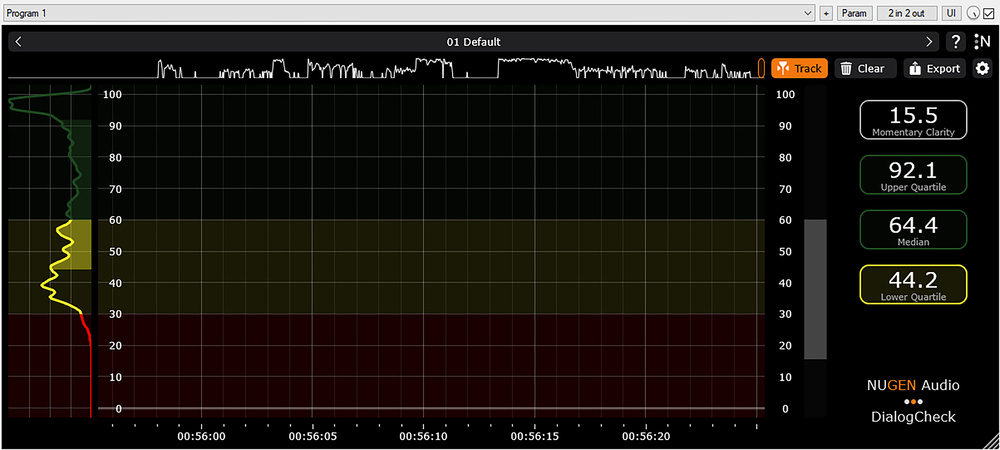 This screenshot shows the results of the same dialogue, at the same level, but regularly swamped by music in something of a ‘voice‑under’ mix. While mostly understandable, the intelligibility is significantly impaired, and that degradation is clearly revealed in the median and percentile values, as well as the macro, history and distribution charts.
I then added a music track — Philip Glass’ dynamic soundtrack for Koyaanisqatsi — and adjusted the mix so that the dialogue was regularly swamped by the music (a clear ‘voice‑under’ as opposed to a voiceover, if you will!). The results of this relatively difficult‑to‑follow mix gave an upper quartile value of 92.1, a lower quartile of 44.2, and a median value of 64.4, with momentary values ranging from mid‑teens to mid‑90s — numbers that I would suggest really do relate realistically to the true (low) intelligibility of my rather dubious mix! The DialogCheck screenshots I’ve included here show both the clean audio and music‑swamped versions for your entertainment!
Impressions
Nugen Audio’s DialogCheck plug‑in is delightfully simple to both operate and comprehend, and it appears to give reliable and repeatable assessments of speech clarity, corresponding convincingly to the human experience. As a result, the DialogCheck numbers can be used both to QC and approve finished programmes, as well as to guide production and post‑production crews in optimising the speech intelligibility throughout the entire production process, from source recordings through to the final post‑production mix.
For professionals and aspiring amateur sound creators and mixers across all genres, whether working on video or audio‑only material, DialogCheck is a genuinely useful plug‑in. But it will be even more useful to production companies and broadcast or streaming organisations who want a reliable means of quickly assessing programme content to provide quality assurance.
Alternatives
Academic, medical and industrial speech intelligibility assessment software has been available for some time, and is used for evaluating speech disorders, public address and emergency warning system efficacy, and so forth. However, DialogCheck is the only system available in a standard plug‑in format for DAWs and optimised for production audio content — as far as I am aware.
Pros
- Easy to comprehend, recognisable metering format.
- Familiar operating concepts.
- Simple but quantified and repeatable numeric evaluations.
- Compatible with all standard DAWs and production channel formats.
Cons
- None.
Summary
An ingenious and highly effective tool which evaluates speech intelligibility within a standard and very familiar DAW plug‑in metering paradigm.