

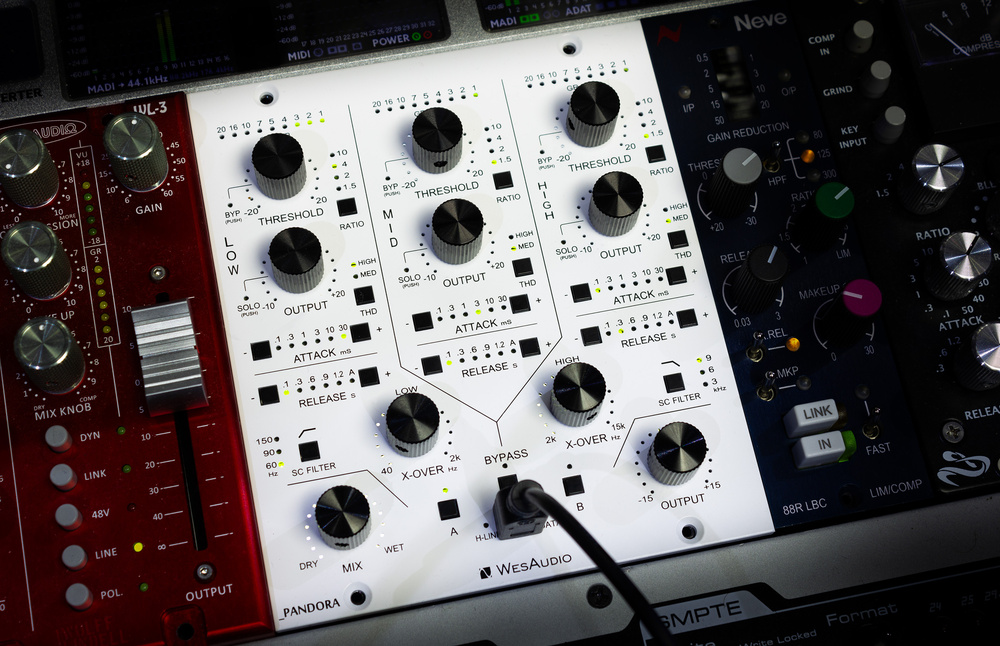
Already leading the way when it comes to plug‑in remote control of analogue hardware, Wes are now bringing their expertise to bear on a wider range of processors.
Analogue multiband compressors remain rare: they’re relatively expensive to implement, and the necessary user controls can take up a lot of space. Unsurprisingly, then, they’re rarer still in the 500‑series format, and Wes Audio’s Pandora is the first I’ve seen that delivers anything like ‘conventional’ analogue three‑band compression in this format. But it offers way more besides. As well as boasting other processing options that I’ll explore below, it can be remotely controlled by a DAW plug‑in to facilitate recall, automation and preset management. Yet, while the plug‑in is rightly a headline feature, pretty much everything can still be done using the touch‑sensitive front‑panel hardware controls too. In fact, you can use the hardware to control the plug‑in and record automation as well. Importantly, this arrangement reduces the risk of the Pandora ever being rendered obsolete by OS or DAW developments, and (for whatever reason) a lack of software support in the future.
Hands On
So let’s start with the hardware. The Pandora is W I D E! Though a stereo device, it occupies three module slots in the host 500‑series rack: it uses only the leftmost pair for power and I/O but physically extends across the third, such that slot 3 can’t be used for other modules.
There’s a lot of information on the front panel, but it’s all sensibly laid out. While the A and B preset storage/recall buttons (you can also copy settings from one to the other) are arguably harder to use when a USB cable is plugged into the front panel, you’ll likely be using the plug‑in’s greater options for that function, and if it really bothers you then Wes’ Titan ng500‑series rack can provide the necessary USB communication through the card‑edge connector.
The main hardware controls are either touch‑sensitive digital push‑turn encoders or buttons, with various tiny green or red LEDs indicating the status. Nicely visible without being over‑bright, these are particularly effective at indicating the position of the rotary encoders: multiple LEDs of different brightnesses combine to give really precise feedback, and I’ve not seen anyone do this better.
Thin black lines group the controls visually, into one of the three frequency bands or for global functions. Each band, running from left to right, has a threshold encoder with a nine‑LED gain‑reduction meter above (again, elegantly implemented). The threshold control is a push‑turn encoder: turn to set the threshold, or push to bypass compression for that band. This is one of the touch‑sensitive ones, and putting your fingers on it will highlight the corresponding controls on the plug‑in when in use. The same goes for the output level control, for which a push solos that band.
The remaining per‑band controls are buttons that step through their different parameters’ settings. One sets the ratio (10, 4, 2 or 1.5:1 for all bands), and another adds harmonic distortion (High, Med or off), which you can think of as a saturation effect. Further down, the attack (0.1, 0.3, 1, 3, 10 or 30 ms) and release (0.1, 0.3, 0.6, 0.9 or 1.2 seconds, or an automatic release) each have a pair of buttons, one to scroll up through the options, the other down.
Below are various global controls. Between each pair of bands is a knob to set the frequency of the crossover filter. While these are also push‑turn encoders, there doesn’t appear, at the time of writing, to be any action mapped to the push function. The filters range from 40Hz to 2kHz and 2‑15 kHz, respectively, both with gentle 6dB/octave slopes. There are also side‑chain high‑pass (off, and 60, 90 or 150 Hz)...
You are reading one of the locked Subscribers-only articles from our latest 5 issues.
You've read 30% of this article for FREE, so to continue reading...
- ✅ Log in - if you have a Digital Subscription you bought from SoundOnSound.com
- ⬇️ Buy & Download this Single Article in PDF format £0.83 GBP$1.49 USD
For less than the price of a coffee, buy now and immediately download to your computer, tablet or mobile. - ⬇️ ⬇️ ⬇️ Buy & Download the FULL ISSUE PDF
Our 'full SOS magazine' for smartphone/tablet/computer. More info... - 📲 Buy a DIGITAL subscription (or 📖 📲 Print + Digital sub)
Instantly unlock ALL Premium web articles! We often release online-only content.
Visit our ShopStore.